
In this tutorial, you’ll learn how to implement CRUD (Create, Read, Update, Delete) operations in a Flutter app with a PHP-MySQL backend. By the end of this tutorial, you’ll have a working app that can interact with a MySQL database through PHP scripts to perform essential operations.
Overview
We’ll cover the following key areas:
- Project Setup: Organize your Flutter project and set up the necessary files.
- Add User: Create a screen for adding new users to the database.
- List Users: Display a list of users fetched from the database.
- Edit User: Allow users to edit existing user details.
- Delete User: Implement functionality to delete users from the database.
Backend Integration: Connect your Flutter app to PHP scripts for handling database operations.
Step-by-Step Guide
1. Project Setup
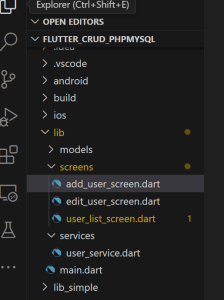
Before we dive into the code, let’s set up the Flutter project. You’ll need to create a new Flutter application and organize it into the following directory structure:
- add_user_screen.dart: UI and logic for adding new users.
- user_list_screen.dart: Display a list of users and manage user interactions.
- edit_user_screen.dart: Interface for editing user details.
- services/user_service.dart: Handle API requests to the PHP backend.
- models/user.dart: Define the user data model.
- main.dart: Entry point of the app with routing setup.
Flutter create flutter_crud_phpmysql
Directory Structure:
2. Models:
The User class in Dart is a model used to represent a user in a Flutter application. It encapsulates various properties related to a user and provides methods for converting between the model and JSON format. This class is essential for managing user data effectively in the app, especially when interacting with a backend service.
Properties:
- id (int): The unique identifier for the user. This is a required field.
- email (String): The email address of the user. This is a required field.
- firstName (String?): The user’s first name, which is optional and can be null.
- lastName (String?): The user’s last name, which is optional and can be null.
- city (String?): The city where the user resides, which is optional and can be null.
- password (String?): The user’s password, which is optional and can be null.
Constructor:
The constructor allows initializing a User object with required fields (id, email) and optional fields (firstName, lastName, city, password). It uses named parameters, making it clear which fields are required and which are optional.
fromJson Factory Constructor:
The User.fromJson factory constructor is used to create a User instance from a JSON map. It parses the JSON data and initializes the User object with the corresponding values. It includes checks to ensure that optional fields are handled properly:
-
- It parses the id as an integer.
- It converts fields to their respective types if they are not null.
toJson Method:
The toJson method converts the User object back into a JSON map. This is useful for sending user data to a backend server or saving it in a local database. It includes all properties of the User, including optional fields, which may be null.
user.dart
class User {
  final int id;
  final String email;
  final String? firstName;
  final String? lastName;
  final String? city;
  final String? password;


  User({
    required this.id,
    required this.email,
    this.firstName,
    this.lastName,
    this.city,
    this.password,
  });


  factory User.fromJson(Map<String, dynamic> json) {
    return User(
      id: int.parse(json['id']),
      email: json['email'],
      firstName:
          json['first_name'] != null ? json['first_name'] as String : null,
      lastName: json['last_name'] != null ? json['last_name'] as String : null,
      city: json['city'] != null ? json['city'] as String : null,
      password: json['password'] != null ? json['password'] as String : null,
    );
  }


  Map<String, dynamic> toJson() {
    return {
      'id': id,
      'email': email,
      'first_name': firstName,
      'last_name': lastName,
      'city': city,
      'password': password,
    };
  }
}
2. Add User:
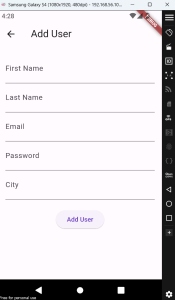
In this section, you will create a screen that allows users to add new entries to the database.
- File: add_user_screen.dart
- Key Components:
- A form with fields for user details.
- Validation to ensure all fields are filled correctly.
- A button to submit the form and send the data to the PHP backend.
Explanation: This screen uses a StatefulWidget to manage form input and submission. You’ll use TextEditingController instances to handle user input and validate the form before sending it to the backend using UserService().createUser().
add_user_screen.dart
import 'package:flutter/material.dart';

import 'package:fluttertoast/fluttertoast.dart';

import '../models/user.dart';

import '../services/user_service.dart';


class AddUserScreen extends StatefulWidget {

  @override

  _AddUserScreenState createState() => _AddUserScreenState();

}


class _AddUserScreenState extends State<AddUserScreen> {

  final _formKey = GlobalKey<FormState>();

  late TextEditingController _firstNameController;

  late TextEditingController _lastNameController;

  late TextEditingController _emailController;

  late TextEditingController _passwordController;

  late TextEditingController _cityController;


  @override

  void initState() {

    super.initState();

    _firstNameController = TextEditingController();

    _lastNameController = TextEditingController();

    _emailController = TextEditingController();

    _passwordController = TextEditingController();

    _cityController = TextEditingController();

  }


  Future<void> _addUser() async {

    if (_formKey.currentState!.validate()) {

      final newUser = User(

        id: 0, // Assume that the backend generates the ID

        firstName: _firstNameController.text,

        lastName: _lastNameController.text,

        email: _emailController.text,

        password: _passwordController.text,

        city: _cityController.text,

      );


      try {

        await UserService()

            .createUser(newUser); // Ensure this returns Future<void>

        Fluttertoast.showToast(

          msg: "User added successfully",

          toastLength: Toast.LENGTH_SHORT,

          gravity: ToastGravity.BOTTOM,

          timeInSecForIosWeb: 1,

          backgroundColor: Colors.green,

          textColor: Colors.white,

          fontSize: 16.0,

        );

        Navigator.pop(context); // Go back to the previous screen

      } catch (e) {

        Fluttertoast.showToast(

          msg: "Error adding user: $e",

          toastLength: Toast.LENGTH_SHORT,

          gravity: ToastGravity.BOTTOM,

          timeInSecForIosWeb: 1,

          backgroundColor: Colors.red,

          textColor: Colors.white,

          fontSize: 16.0,

        );

      }

    }

  }


  @override

  void dispose() {

    _firstNameController.dispose();

    _lastNameController.dispose();

    _emailController.dispose();

    _passwordController.dispose();

    _cityController.dispose();

    super.dispose();

  }


  @override

  Widget build(BuildContext context) {

    return Scaffold(

      appBar: AppBar(

        title: Text('Add User'),

      ),

      body: Padding(

        padding: const EdgeInsets.all(16.0),

        child: Form(

          key: _formKey,

          child: Column(

            children: <Widget>[

              TextFormField(

                controller: _firstNameController,

                decoration: InputDecoration(labelText: 'First Name'),

                validator: (value) {

                  if (value == null || value.isEmpty) {

                    return 'Please enter a first name';

                  }

                  return null;

                },

              ),

              TextFormField(

                controller: _lastNameController,

                decoration: InputDecoration(labelText: 'Last Name'),

                validator: (value) {

                  if (value == null || value.isEmpty) {

                    return 'Please enter a last name';

                  }

                  return null;

                },

              ),

              TextFormField(

                controller: _emailController,

                decoration: InputDecoration(labelText: 'Email'),

                validator: (value) {

                  if (value == null || value.isEmpty) {

                    return 'Please enter an email';

                  }

                  return null;

                },

              ),

              TextFormField(

                controller: _passwordController,

                decoration: InputDecoration(labelText: 'Password'),

                obscureText: true,

                validator: (value) {

                  if (value == null || value.isEmpty) {

                    return 'Please enter a password';

                  }

                  return null;

                },

              ),

              TextFormField(

                controller: _cityController,

                decoration: InputDecoration(labelText: 'City'),

                validator: (value) {

                  if (value == null || value.isEmpty) {

                    return 'Please enter a city';

                  }

                  return null;

                },

              ),

              SizedBox(height: 20),

              ElevatedButton(

                onPressed: _addUser,

                child: Text('Add User'),

              ),

            ],

          ),

        ),

      ),

    );

  }

}
3. List Users:
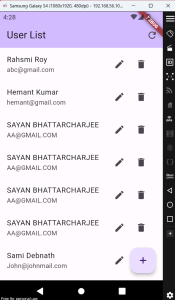
Here, you will create a screen to fetch and display a list of users from the database.
- File: user_list_screen.dart
- Key Components:
- A list view to display users.
- Options to refresh the list, view user details, edit, or delete users.
Explanation: This screen uses a StatefulWidget to manage the state of the user list. You’ll fetch users using UserService().fetchUsers() and handle user interactions such as editing or deleting entries. It also includes a refresh button to reload the data.
user_list_screen.dart
import 'package:flutter/material.dart';
import 'package:fluttertoast/fluttertoast.dart';
import '../models/user.dart';
import '../services/user_service.dart';
import 'edit_user_screen.dart';


class UserListScreen extends StatefulWidget {
  @override
  _UserListScreenState createState() => _UserListScreenState();
}


class _UserListScreenState extends State<UserListScreen> {
  late Future<List<User>> _users;


  @override
  void initState() {
    super.initState();
    _users = UserService().fetchUsers();
  }


  Future<void> _refreshUserList() async {
    setState(() {
      _users = UserService().fetchUsers();
    });
  }


  void _navigateToEdit(User user) {
    Navigator.pushNamed(
      context,
      '/edit',
      arguments: user,
    );
  }


  void _navigateToAdd() {
    Navigator.pushNamed(context, '/add');
  }


  Future<void> _deleteUser(User user) async {
    bool? confirmDelete = await showDialog(
      context: context,
      builder: (context) => AlertDialog(
        title: Text('Confirm Deletion'),
        content: Text(
            'Are you sure you want to delete ${user.firstName} ${user.lastName}?'),
        actions: <Widget>[
          TextButton(
            onPressed: () => Navigator.of(context).pop(false),
            child: Text('Cancel'),
          ),
          TextButton(
            onPressed: () => Navigator.of(context).pop(true),
            child: Text('Delete'),
          ),
        ],
      ),
    );


    if (confirmDelete == true) {
      try {
        await UserService().deleteUser(user.id); // Use id directly as int
        _refreshUserList(); // Refresh the list after deletion
        Fluttertoast.showToast(
          msg: "User deleted successfully",
          toastLength: Toast.LENGTH_SHORT,
          gravity: ToastGravity.BOTTOM,
          timeInSecForIosWeb: 1,
          backgroundColor: Colors.green,
          textColor: Colors.white,
          fontSize: 16.0,
        );
      } catch (e) {
        Fluttertoast.showToast(
          msg: "Error deleting user: $e",
          toastLength: Toast.LENGTH_SHORT,
          gravity: ToastGravity.BOTTOM,
          timeInSecForIosWeb: 1,
          backgroundColor: Colors.red,
          textColor: Colors.white,
          fontSize: 16.0,
        );
      }
    }
  }


  @override
  Widget build(BuildContext context) {
    return Scaffold(
      appBar: AppBar(
        backgroundColor: Theme.of(context).colorScheme.inversePrimary,
        title: Text('User List'),
        actions: <Widget>[
          IconButton(
            icon: Icon(Icons.refresh),
            onPressed: _refreshUserList,
          ),
        ],
      ),
      body: FutureBuilder<List<User>>(
        future: _users,
        builder: (context, snapshot) {
          if (snapshot.connectionState == ConnectionState.waiting) {
            return Center(child: CircularProgressIndicator());
          } else if (snapshot.hasError) {
            return Center(child: Text('Error: ${snapshot.error}'));
          } else if (!snapshot.hasData || snapshot.data!.isEmpty) {
            return Center(child: Text('No users found'));
          }


          final users = snapshot.data!;


          return ListView.builder(
            itemCount: users.length,
            itemBuilder: (context, index) {
              final user = users[index];
              return ListTile(
                title: Text('${user.firstName} ${user.lastName}'),
                subtitle: Text(user.email),
                trailing: Row(
                  mainAxisSize: MainAxisSize.min,
                  children: <Widget>[
                    IconButton(
                      icon: Icon(Icons.edit),
                      onPressed: () => _navigateToEdit(user),
                    ),
                    IconButton(
                      icon: Icon(Icons.delete),
                      onPressed: () => _deleteUser(user),
                    ),
                  ],
                ),
                onLongPress: () => _deleteUser(user),
              );
            },
          );
        },
      ),
      floatingActionButton: FloatingActionButton(
        onPressed: _navigateToAdd,
        tooltip: 'Add User',
        child: Icon(Icons.add),
      ),
    );
  }
}
4. Edit User
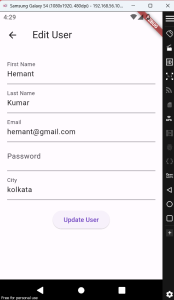
This screen allows you to modify existing user details.
- File: edit_user_screen.dart
- Key Components:
- A form pre-populated with existing user data.
- Validation to ensure correct input.
- A button to submit the updated information to the PHP backend.
Explanation: Similar to the add user screen, this screen uses a StatefulWidget and TextEditingController to manage and submit user data. You’ll use UserService().updateUser() to send the updated data to the backend.
edit_user_screen.dart
import 'package:flutter/material.dart';
import 'package:fluttertoast/fluttertoast.dart';
import '../models/user.dart';
import '../services/user_service.dart';


class EditUserScreen extends StatefulWidget {
  final User user;


  const EditUserScreen({required this.user, Key? key}) : super(key: key);


  @override
  _EditUserScreenState createState() => _EditUserScreenState();
}


class _EditUserScreenState extends State<EditUserScreen> {
  final _formKey = GlobalKey<FormState>();
  late TextEditingController _firstNameController;
  late TextEditingController _lastNameController;
  late TextEditingController _emailController;
  late TextEditingController
      _passwordController; // Added controller for password
  late TextEditingController _cityController;


  @override
  void initState() {
    super.initState();
    _firstNameController = TextEditingController(text: widget.user.firstName);
    _lastNameController = TextEditingController(text: widget.user.lastName);
    _emailController = TextEditingController(text: widget.user.email);
    _passwordController =
        TextEditingController(); // Initialize password controller
    _cityController = TextEditingController(text: widget.user.city);
  }


  void _updateUser() async {
    if (_formKey.currentState!.validate()) {
      final updatedUser = User(
        id: widget.user.id,
        firstName: _firstNameController.text,
        lastName: _lastNameController.text,
        email: _emailController.text,
        password: _passwordController.text, // Include password field
        city: _cityController.text,
      );


      try {
        await UserService().updateUser(updatedUser);
        Fluttertoast.showToast(
          msg: "User updated successfully",
          toastLength: Toast.LENGTH_SHORT,
          gravity: ToastGravity.BOTTOM,
          timeInSecForIosWeb: 1,
          backgroundColor: Colors.green,
          textColor: Colors.white,
          fontSize: 16.0,
        );
        Navigator.pop(context); // Go back to the previous screen
      } catch (e) {
        Fluttertoast.showToast(
          msg: "Error updating user: $e",
          toastLength: Toast.LENGTH_SHORT,
          gravity: ToastGravity.BOTTOM,
          timeInSecForIosWeb: 1,
          backgroundColor: Colors.red,
          textColor: Colors.white,
          fontSize: 16.0,
        );
      }
    }
  }


  @override
  Widget build(BuildContext context) {
    return Scaffold(
      appBar: AppBar(
        title: Text('Edit User'),
      ),
      body: Padding(
        padding: const EdgeInsets.all(16.0),
        child: Form(
          key: _formKey,
          child: Column(
            children: <Widget>[
              TextFormField(
                controller: _firstNameController,
                decoration: InputDecoration(labelText: 'First Name'),
                validator: (value) {
                  if (value == null || value.isEmpty) {
                    return 'Please enter a first name';
                  }
                  return null;
                },
              ),
              TextFormField(
                controller: _lastNameController,
                decoration: InputDecoration(labelText: 'Last Name'),
                validator: (value) {
                  if (value == null || value.isEmpty) {
                    return 'Please enter a last name';
                  }
                  return null;
                },
              ),
              TextFormField(
                controller: _emailController,
                decoration: InputDecoration(labelText: 'Email'),
                validator: (value) {
                  if (value == null || value.isEmpty) {
                    return 'Please enter an email';
                  }
                  return null;
                },
              ),
              TextFormField(
                controller: _passwordController, // Added password field
                decoration: InputDecoration(labelText: 'Password'),
                obscureText: true, // Hide the password input
                validator: (value) {
                  if (value == null || value.isEmpty) {
                    return 'Please enter a password';
                  }
                  return null;
                },
              ),
              TextFormField(
                controller: _cityController,
                decoration: InputDecoration(labelText: 'City'),
                validator: (value) {
                  if (value == null || value.isEmpty) {
                    return 'Please enter a city';
                  }
                  return null;
                },
              ),
              SizedBox(height: 20),
              ElevatedButton(
                onPressed: _updateUser,
                child: Text('Update User'),
              ),
            ],
          ),
        ),
      ),
    );
  }
}
4. Backend Integration:
Set up PHP scripts to handle CRUD operations with the MySQL database.
- File: services/user_service.dart
- Key Components:
- API methods to perform create, read, update, and delete operations.
- Error handling and response management.
services/user_service.dart
import 'dart:convert';
import 'package:http/http.dart' as http;
import 'package:fluttertoast/fluttertoast.dart';
import 'package:flutter/material.dart';
import '../models/user.dart';


class UserService {
  final String apiUrl =
      'https://acesoftech.co.in/API/react-register-login/register-login-php-simple';


  Future<List<User>> fetchUsers() async {
    try {
      final response = await http.get(Uri.parse('$apiUrl/select.php'));


      //print('Response status: ${response.statusCode}');
      //print('Response body: ${response.body}'); // Print the raw response body


      if (response.statusCode == 200) {
        final Map<String, dynamic> data = json.decode(response.body);
        //print('Decoded data: $data'); // Print the decoded data


        if (data.containsKey('records') && data['records'] is List) {
          final List<dynamic> records = data['records'];
          // print('Records: $records'); // Print the records list
          return records.map((json) => User.fromJson(json)).toList();
        } else {
          throw Exception('Unexpected JSON structure: ${data.keys}');
        }
      } else {
        throw Exception(
            'Failed to load users. Status code: ${response.statusCode}');
      }
    } catch (e) {
      print('Error fetching users: $e'); // Print error details
      throw Exception('Failed to load users: $e');
    }
  }


  Future<void> createUser(User user) async {
    try {
      //print('Attempting to call API...');


      // Prepare JSON data
      final Map<String, dynamic> jsonData = {
        'email': user.email,
        'password': user.password,
        'first_name': user.firstName,
        'last_name': user.lastName,
        'city': user.city,
      };


      // Print JSON data for debugging
      //print('Sending data: ${jsonEncode(jsonData)}');


      final response = await http.post(
        Uri.parse('$apiUrl/insert.php'),
        headers: {'Content-Type': 'application/json'},
        body: jsonEncode(jsonData),
      );


      //print('Status code: ${response.statusCode}');
      //print('Headers: ${response.headers}');


      if (response.statusCode == 200) {
        if (response.body.isNotEmpty) {
          print('Response body: ${response.body}');
        } else {
          print('Response body is empty');
        }


        final Map<String, dynamic> responseData = json.decode(response.body);
        if (responseData['data']['status'] == 'valid') {
          Fluttertoast.showToast(
            msg: "User added successfully",
            toastLength: Toast.LENGTH_SHORT,
            gravity: ToastGravity.BOTTOM,
            timeInSecForIosWeb: 1,
            backgroundColor: Colors.green,
            textColor: Colors.white,
            fontSize: 16.0,
          );
        } else {
          throw Exception(
              'Failed to add user: ${responseData['data']['error']}');
        }
      } else {
        throw Exception(
            'Failed to add user. Status code: ${response.statusCode}');
      }
    } catch (e) {
      Fluttertoast.showToast(
        msg: "Error adding user: $e",
        toastLength: Toast.LENGTH_SHORT,
        gravity: ToastGravity.BOTTOM,
        timeInSecForIosWeb: 1,
        backgroundColor: Colors.red,
        textColor: Colors.white,
        fontSize: 16.0,
      );
      //print('Exception caught: $e');
      throw Exception('Failed to add user: $e');
    }
  }


  Future<void> updateUser(User user) async {
    try {
      final response = await http.post(
        Uri.parse('$apiUrl/update.php'),
        headers: {'Content-Type': 'application/json'},
        body: jsonEncode({
          'id': user.id.toString(), // Convert to String for the URL
          'email': user.email,
          'password': user.password,
          'first_name': user.firstName,
          'last_name': user.lastName,
          'city': user.city,
        }),
      );


      if (response.statusCode == 200) {
        final Map<String, dynamic> responseData = json.decode(response.body);
        if (responseData['status'] == 'valid') {
          Fluttertoast.showToast(
            msg: "User updated successfully",
            toastLength: Toast.LENGTH_SHORT,
            gravity: ToastGravity.BOTTOM,
            timeInSecForIosWeb: 1,
            backgroundColor: Colors.green,
            textColor: Colors.white,
            fontSize: 16.0,
          );
        } else {
          throw Exception('Failed to update user: ${responseData['error']}');
        }
      } else {
        throw Exception(
            'Failed to update user. Status code: ${response.statusCode}');
      }
    } catch (e) {
      Fluttertoast.showToast(
        msg: "Error updating user: $e",
        toastLength: Toast.LENGTH_SHORT,
        gravity: ToastGravity.BOTTOM,
        timeInSecForIosWeb: 1,
        backgroundColor: Colors.red,
        textColor: Colors.white,
        fontSize: 16.0,
      );
      throw Exception('Failed to update user: $e');
    }
  }


  Future<void> deleteUser(int id) async {
    try {
      final response = await http.get(Uri.parse('$apiUrl/delete.php?id=$id'));


      if (response.statusCode == 200) {
        final Map<String, dynamic> responseData = json.decode(response.body);
        if (responseData['status'] == 'valid') {
          Fluttertoast.showToast(
            msg: "User deleted successfully",
            toastLength: Toast.LENGTH_SHORT,
            gravity: ToastGravity.BOTTOM,
            timeInSecForIosWeb: 1,
            backgroundColor: Colors.green,
            textColor: Colors.white,
            fontSize: 16.0,
          );
        } else {
          throw Exception('Failed to delete user: ${responseData['error']}');
        }
      } else {
        throw Exception(
            'Failed to delete user. Status code: ${response.statusCode}');
      }
    } catch (e) {
      Fluttertoast.showToast(
        msg: "Error deleting user: $e",
        toastLength: Toast.LENGTH_SHORT,
        gravity: ToastGravity.BOTTOM,
        timeInSecForIosWeb: 1,
        backgroundColor: Colors.red,
        textColor: Colors.white,
        fontSize: 16.0,
      );
      throw Exception('Failed to delete user: $e');
    }
  }
}
main.dart
import 'package:flutter/material.dart';
import 'models/user.dart'; // Import User model
import 'screens/add_user_screen.dart'; // Import add user screen
import 'screens/edit_user_screen.dart'; // Import edit user screen
import 'screens/user_list_screen.dart'; // Import user list screen


void main() => runApp(MyApp());


class MyApp extends StatelessWidget {
  @override
  Widget build(BuildContext context) {
    return MaterialApp(
      title: 'User List App',
      theme: ThemeData(
        colorScheme: ColorScheme.fromSeed(seedColor: Colors.deepPurple),
        useMaterial3: true,
      ),
      home: UserListScreen(), // Set UserListScreen as home
      routes: {
        '/add': (context) => AddUserScreen(),
        '/edit': (context) {
          final User user = ModalRoute.of(context)!.settings.arguments as User;
          return EditUserScreen(user: user);
        },
      },
    );
  }
}
Summary:
In this tutorial, you will learn how to implement CRUD (Create, Read, Update, Delete) operations in a Flutter application using a PHP-MySQL backend. This guide will walk you through the essential steps to enable your app to interact seamlessly with a MySQL database through PHP scripts.
We begin with setting up the Flutter project, including the directory structure and key files. The main files include add_user_screen.dart for adding new users, user_list_screen.dart for displaying and managing user data, and edit_user_screen.dart for modifying user details. We will also work with user_service.dart to handle API requests and user.dart to define the user data model.
Key Steps:
Add User: Create a form in add_user_screen.dart to input user details and submit them to the PHP backend. This screen will include validation to ensure correct data entry.
List Users: Develop a user interface in user_list_screen.dart to fetch and display user data from the database. This screen will allow for refreshing the list, and options to view, edit, or delete users.
Edit User: Implement a form in edit_user_screen.dart to update existing user details. This screen will load the current user data and submit the changes to the backend.
Delete User: Add functionality to remove users from the list with a delete option, which will also confirm the action before sending the request to the PHP backend.
Backend Integration: Set up PHP scripts to handle CRUD operations with MySQL. In user_service.dart, you will define methods for creating, fetching, updating, and deleting users, ensuring proper communication between the Flutter app and the backend.
By following these steps, you’ll create a functional Flutter application capable of performing full CRUD operations with a PHP and MySQL backend.





