
AI Reading
Quick summary of this article
This guide explains how to set up authentication in Laravel 12 using Sanctum, covering user registration, login, logout, and route protection. It walks through installing Laravel and Sanctum, creating an authentication controller, protecting routes for dashboards and resources, and building the necessary Blade views. The article also includes instructions for enabling email verification and password reset functionality to ensure only verified users can access protected pages.
- Sanctum provides token-based API authentication, and installation requires running
composer require laravel/sanctumfollowed by publishing its service provider and migrating the database. - Protected routes, such as the dashboard and category/product resources, are wrapped in the
auth:sanctummiddleware group, which redirects unauthenticated users to the login page. - To enable email verification, the User model must implement the
MustVerifyEmailinterface, and the dashboard route should use theverifiedmiddleware in addition toauth. - The setup includes dedicated routes and Blade views for email verification notices, resending verification links, and password reset flows.
- Key Laravel packages used in this setup include Sanctum for authentication, Sail for Docker-based development, Tinker for CLI interaction, and Carbon for date/time handling.
Introduction
Laravel 12 provides a robust authentication system. With Sanctum, API-based authentication becomes efficient. This guide helps you implement registration, login, logout, and protect routes for categories and products. Unauthenticated users will be redirected to the login page.
Prerequisites
- Laravel 11 installed
- Composer and PHP 8.3+
- MySQL or any Laravel-supported database
- Postman or a frontend (Vue.js, React, or Blade) to test API calls
Step 1: Install Laravel 12
composer create-project laravel/laravel laravel12-email-verify
cd laravel12-email-verify
Step 2: Install Sanctum
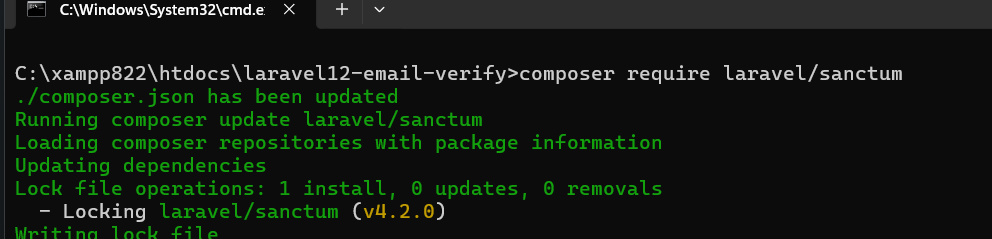
composer require laravel/sanctum
 php artisan vendor:publish --provider="Laravel\Sanctum\SanctumServiceProvider"
 php artisan migrate
Step 3: Set Up User Authentication
Create a controller:
php artisan make:controller AuthControllerUpdate app/Models/User.php:
use Laravel\Sanctum\HasApiTokens;

class User extends Authenticatable
{
    use HasApiTokens, HasFactory, Notifiable;
}
Add this code inside AuthController.php:
<?php

namespace App\Models;

use Illuminate\Database\Eloquent\Factories\HasFactory;
use Illuminate\Foundation\Auth\User as Authenticatable;
use Illuminate\Notifications\Notifiable;
use Laravel\Sanctum\HasApiTokens;

class User extends Authenticatable
{
    use HasApiTokens, HasFactory, Notifiable;

    /**
     * The attributes that are mass assignable.
     *
     * @var list<string>
     */
    protected $fillable = [
        'name',
        'email',
        'password',
    ];

    /**
     * The attributes that should be hidden for serialization.
     *
     * @var list<string>
     */
    protected $hidden = [
        'password',
        'remember_token',
    ];

    /**
     * Get the attributes that should be cast.
     *
     * @return array<string, string>
     */
    protected function casts(): array
    {
        return [
            'email_verified_at' => 'datetime',
            'password' => 'hashed',
        ];
    }
}
Step 4: Protect Routes
Update routes/web.php like this:
use App\Http\Controllers\AuthController;
use App\Http\Controllers\CategoryController;
use App\Http\Controllers\ProductController;


Route::get('/login', [AuthController::class, 'showLoginForm'])->name('login');
Route::get('/register', [AuthController::class, 'showRegisterForm'])->name('register');

Route::post('/register', [AuthController::class, 'register']);
Route::post('/login', [AuthController::class, 'login']);

Route::middleware('auth:sanctum')->group(function () {
    Route::get('/dashboard', function () {
        return view('dashboard');
    })->name('dashboard');
    Route::post('/logout', [AuthController::class, 'logout'])->name('logout');
    Route::resource('/categories', CategoryController::class);
    Route::resource('/products', ProductController::class);
});
Step 5: Create Blade Files
Layout File
Create: resources/views/layouts/app.blade.php
<!DOCTYPE html>
<html>
<head>
    <title>@yield('title')</title>
</head>
<body>
    @yield('content')
</body>
</html>
Login Page
Create: resources/views/auth/login.blade.php
@extends('layouts.app')
@section('title', 'Login')
@section('content')
<form method="POST" action="{{ route('login') }}">
    @csrf
    <input type="email" name="email" placeholder="Email" required>
    <input type="password" name="password" placeholder="Password" required>
    <button type="submit">Login</button>
</form>
@endsection
Register Page
Create: resources/views/auth/register.blade.php
@extends('layouts.app')
@section('title', 'Register')
@section('content')
<form method="POST" action="{{ route('register') }}">
    @csrf
    <input type="text" name="name" placeholder="Name" required>
    <input type="email" name="email" placeholder="Email" required>
    <input type="password" name="password" placeholder="Password" required>
    <button type="submit">Register</button>
</form>
@endsection
Dashboard Page
Create: resources/views/dashboard.blade.php
@extends('layouts.app')
@section('title', 'Dashboard')
@section('content')
<h1>Welcome to Dashboard</h1>
<form method="POST" action="{{ route('logout') }}">
    @csrf
    <button type="submit">Logout</button>
</form>

@endsection
Categories Page
Create: resources/views/categories/index.blade.php
@extends('layouts.app')
@section('title', 'Categories')
@section('content')
<h1>Categories</h1>
<a href="{{ route('categories.create') }}">Add Category</a>
<ul>
@foreach($categories as $category)
    <li>{{ $category->name }}</li>
@endforeach
</ul>
@endsection
Products Page
Create: resources/views/products/index.blade.php
@extends('layouts.app')
@section('title', 'Products')
@section('content')
<h1>Products</h1>
<a href="{{ route('products.create') }}">Add Product</a>
<ul>
@foreach($products as $product)
    <li>{{ $product->name }}</li>
@endforeach
</ul>
@endsection
Laravel Package Discovery Summary
| Package | Purpose |
|---|---|
laravel/pail |
Internal Laravel package for structured output (often related to logs or diagnostics). |
laravel/sail |
Laravel Sail — the Docker-based local development environment for Laravel. |
laravel/sanctum |
Provides token-based API authentication. |
laravel/tinker |
Allows you to interact with your Laravel app via REPL (CLI). |
nesbot/carbon |
Date and time manipulation (used by Laravel models like created_at, updated_at). |
nunomaduro/collision |
Beautiful error reporting in the console (during artisan commands). |
nunomaduro/termwind |
Renders beautiful colored and styled console output (used in Artisan). |
Step 6: Enable Email Verification
To ensure only verified users can access protected routes, Laravel’s built-in email verification system can be enabled.
Update User.php to implement MustVerifyEmail
Generate Controllers
php artisan make:controller Auth/ForgotPasswordController
php artisan make:controller Auth/ResetPasswordController
web.php
Create View: resources/views/auth/verify.blade.php
@extends('layouts.app')

@section('content')
    <p>Please verify your email address using the link sent to your inbox.</p>

    @if (session('message'))
        <div class=\"alert alert-success\">
            {{ session('message') }}
        </div>
    @endif

    <form method=\"POST\" action=\"{{ route('verification.send') }}\">
        @csrf
        <button type=\"submit\">Resend Verification Email</button>
    </form>
@endsection
Create View: resources/views/auth/forgot-password.blade.php
@extends('layouts.app')

@section('content')
    <h2>Forgot Password</h2>
    @if (session('status'))
        <div class=\"alert alert-success\">{{ session('status') }}</div>
    @endif

    <form method=\"POST\" action=\"{{ route('password.email') }}\">
        @csrf
        <input type=\"email\" name=\"email\" required placeholder=\"Enter your email\" />
        <button type=\"submit\">Send Reset Link</button>
    </form>
@endsection
Create View: resources/views/auth/reset-password.blade.php
@extends('layouts.app')

@section('content')
    <h2>Reset Password</h2>

    <form method=\"POST\" action=\"{{ route('password.update') }}\">
        @csrf
        <input type=\"hidden\" name=\"token\" value=\"{{ $token }}\">

        <input type=\"email\" name=\"email\" value=\"{{ old('email') }}\" required />
        <input type=\"password\" name=\"password\" required placeholder=\"New Password\" />
        <input type=\"password\" name=\"password_confirmation\" required placeholder=\"Confirm Password\" />

        <button type=\"submit\">Reset Password</button>
    </form>
@endsection
Summary
We implemented Laravel 11 authentication with Sanctum and Blade templates, including registration, login, and protected routes for dashboard, categories, and products. Unauthorized users are redirected to the login page, ensuring a secure and user-friendly system.