
Introduction
Flutter is a powerful framework for building cross-platform mobile applications. In this tutorial, we will create a Flutter authentication app that allows users to register, log in, and access protected pages like the Dashboard and My Account. The app will use PHP and MySQL as the backend, handling user authentication and data storage. We will also implement route navigation and session management using SharedPreferences to keep users logged in. By the end of this guide, you will have a functional authentication system integrated into a Flutter application.
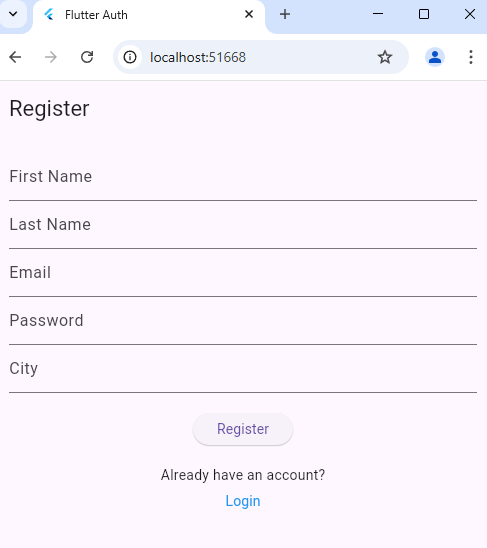
1. Create the User Model (lib/models/user_model.dart)
class User {
  final String email;
  final String firstName;
  final String lastName;
  final String city;

  User({
    required this.email,
    required this.firstName,
    required this.lastName,
    required this.city,
  });

  factory User.fromJson(Map<String, dynamic> json) {
    return User(
      email: json['email'],
      firstName: json['first_name'],
      lastName: json['last_name'],
      city: json['city'] ?? '',
    );
  }

  Map<String, dynamic> toJson() {
    return {
      'email': email,
      'first_name': firstName,
      'last_name': lastName,
      'city': city,
    };
  }
}
2. Create API Service for Authentication (lib/services/api_service.dart)
import 'dart:convert';
import 'package:http/http.dart' as http;
import 'package:shared_preferences/shared_preferences.dart';
import '../models/user_model.dart';

class ApiService {
  static const String baseUrl = "your main url here"; // Change this

  /// Register User
  ///
static Future<Map<String, dynamic>> registerUser(
  String email, String password, String firstName, String lastName, String city
) async {
  final requestBody = jsonEncode({
    'email': email,
    'password': password,
    'first_name': firstName,
    'last_name': lastName,
    'city': city,
  });

  print('Request Body: $requestBody'); // Print request body before sending

  final response = await http.post(
    Uri.parse('$baseUrl/insert.php'),
    body: requestBody,
    headers: {'Content-Type': 'application/json'},
  );

  print('Raw API Response: ${response.body}'); // Print raw response for debugging

  if (response.statusCode == 200) {
    final decodedResponse = jsonDecode(response.body);
    final data = decodedResponse['data']; // Extracting the nested 'data' object

    print('API Response: $decodedResponse');

    return {
      'success': data['status'] == 'valid', // Checking status correctly
      'message': data['status'] == 'valid' ? 'Registration successful' : 'Problem in registration'
    };
  }

  return {
    'success': false,
    'message': 'Problem in registration. Please try again.'
  };
}

  /// Login User
 static Future<bool> loginUser(String email, String password) async {
  final response = await http.post(
    Uri.parse('$baseUrl/login.php'),
    body: jsonEncode({'email': email, 'password': password}),
    headers: {'Content-Type': 'application/json'},
  );

  final datas = jsonDecode(response.body);
  print("Response body $datas");

  if (response.statusCode == 200) {
    print("Status 200 Passed");
    final data = jsonDecode(response.body);
    if (data['success'] == true) {
      SharedPreferences prefs = await SharedPreferences.getInstance();
      prefs.setString('email', email);
      prefs.setString('first_name', data['first_name'] ?? ''); // Prevent null
      prefs.setString('last_name', data['last_name'] ?? '');   // Prevent null
      prefs.setString('city', data.containsKey('city') ? data['city'] ?? '' : ''); // Handle missing 'city'
      return true;
    }
  }
  return false;
}

  /// Get User Details
  static Future<User?> getUserDetails() async {
    SharedPreferences prefs = await SharedPreferences.getInstance();
    String? email = prefs.getString('email');
    String? firstName = prefs.getString('first_name');
    String? lastName = prefs.getString('last_name');
    String? city = prefs.getString('city');

    if (email != null) {
      return User(email: email, firstName: firstName ?? '', lastName: lastName ?? '', city: city ?? '');
    }
    return null;
  }

  /// Logout User
  static Future<void> logoutUser() async {
    SharedPreferences prefs = await SharedPreferences.getInstance();
    await prefs.clear();
  }
}
3. Main App with Routes (lib/main.dart)
import 'package:flutter/material.dart';
import 'package:shared_preferences/shared_preferences.dart';
import 'screens/login_screen.dart';
import 'screens/register_screen.dart';
import 'screens/dashboard_screen.dart';
import 'screens/my_account_screen.dart';

void main() {
  runApp(MyApp());
}

class MyApp extends StatelessWidget {
  const MyApp({super.key});

  @override
  Widget build(BuildContext context) {
    return MaterialApp(
      debugShowCheckedModeBanner: false,
      title: 'Flutter Auth',
      initialRoute: '/',
      routes: {
        '/': (context) => RegisterScreen(),
        '/login': (context) => LoginScreen(),
        '/dashboard': (context) => DashboardScreen(),
        '/account': (context) => MyAccountScreen(),
      },
    );
  }
}
Register Screen
import 'package:flutter/material.dart';
import '../services/api_service.dart';
import 'login_screen.dart'; // Import the LoginScreen

class RegisterScreen extends StatelessWidget {
  final TextEditingController emailController = TextEditingController();
  final TextEditingController passwordController = TextEditingController();
  final TextEditingController firstNameController = TextEditingController();
  final TextEditingController lastNameController = TextEditingController();
  final TextEditingController cityController = TextEditingController();

  RegisterScreen({super.key});

  void handleRegister(BuildContext context) async {
    final result = await ApiService.registerUser(
      emailController.text,
      passwordController.text,
      firstNameController.text,
      lastNameController.text,
      cityController.text,
    );

    ScaffoldMessenger.of(context).showSnackBar(
      SnackBar(
        content: Text(result['message']),
        behavior: SnackBarBehavior.floating,
        margin: EdgeInsets.only(top: 50, left: 16, right: 16),
        duration: Duration(seconds: 3),
      ),
    );

    if (result['success']) {
      Navigator.pushReplacementNamed(context, '/');
    }
  }

  @override
  Widget build(BuildContext context) {
    return Scaffold(
      appBar: AppBar(title: Text("Register")),
      body: Padding(
        padding: EdgeInsets.all(16.0),
        child: Column(
          children: [
            TextField(controller: firstNameController, decoration: InputDecoration(labelText: "First Name")),
            TextField(controller: lastNameController, decoration: InputDecoration(labelText: "Last Name")),
            TextField(controller: emailController, decoration: InputDecoration(labelText: "Email")),
            TextField(controller: passwordController, obscureText: true, decoration: InputDecoration(labelText: "Password")),
            TextField(controller: cityController, decoration: InputDecoration(labelText: "City")),
            SizedBox(height: 20),
            ElevatedButton(onPressed: () => handleRegister(context), child: Text("Register")),
            SizedBox(height: 20),
            Text("Already have an account?"),
            TextButton(
              onPressed: () {
                Navigator.push(
                  context,
                  MaterialPageRoute(builder: (context) => LoginScreen()), // Navigate to LoginScreen
                );
              },
              child: Text("Login", style: TextStyle(color: Colors.blue)),
            ),
          ],
        ),
      ),
    );
  }
}
4. Create Login Screen (lib/screens/login_screen.dart)
import 'package:flutter/material.dart';
import '../services/api_service.dart';

class LoginScreen extends StatelessWidget {
  final TextEditingController emailController = TextEditingController();
  final TextEditingController passwordController = TextEditingController();

  LoginScreen({super.key});

  void handleLogin(BuildContext context) async {
    bool success = await ApiService.loginUser(emailController.text, passwordController.text);

    if (success) {
      Navigator.pushReplacementNamed(context, '/dashboard');
    } else {
      ScaffoldMessenger.of(context).showSnackBar(SnackBar(content: Text("Invalid credentials!")));
    }
  }

  @override
  Widget build(BuildContext context) {
    return Scaffold(
      appBar: AppBar(title: Text("Login")),
      body: Padding(
        padding: EdgeInsets.all(16.0),
        child: Column(
          children: [
            TextField(controller: emailController, decoration: InputDecoration(labelText: "Email")),
            TextField(controller: passwordController, obscureText: true, decoration: InputDecoration(labelText: "Password")),
            ElevatedButton(onPressed: () => handleLogin(context), child: Text("Login")),
          ],
        ),
      ),
    );
  }
}

5. Dashboard and Protected Pages
Dashboard Screen (lib/screens/dashboard_screen.dart)
import 'package:flutter/material.dart';
import 'package:shared_preferences/shared_preferences.dart';

class DashboardScreen extends StatefulWidget {
  const DashboardScreen({super.key});

  @override
  _DashboardScreenState createState() => _DashboardScreenState();
}

class _DashboardScreenState extends State<DashboardScreen> {
  String? userEmail;

  @override
  void initState() {
    super.initState();
    loadUserData();
  }

  void loadUserData() async {
    SharedPreferences prefs = await SharedPreferences.getInstance();
    setState(() {
      userEmail = prefs.getString('email') ?? "No Email Found";
    });
  }

  void logout(BuildContext context) async {
    SharedPreferences prefs = await SharedPreferences.getInstance();
    await prefs.clear();
    Navigator.pushReplacementNamed(context, '/');
  }

  @override
  Widget build(BuildContext context) {
    return Scaffold(
      appBar: AppBar(
        title: Text("Dashboard"),
        actions: [
          IconButton(
            icon: Icon(Icons.logout),
            onPressed: () => logout(context),
          ),
        ],
      ),
      body: Center(
        child: Column(
          mainAxisAlignment: MainAxisAlignment.center,
          children: [
            Text("Welcome!", style: TextStyle(fontSize: 22, fontWeight: FontWeight.bold)),
            SizedBox(height: 10),
            Text("Logged in as: $userEmail"),
            SizedBox(height: 20),
            ElevatedButton(
              onPressed: () => Navigator.pushNamed(context, '/account'),
              child: Text("My Account"),
            ),
          ],
        ),
      ),
    );
  }
}
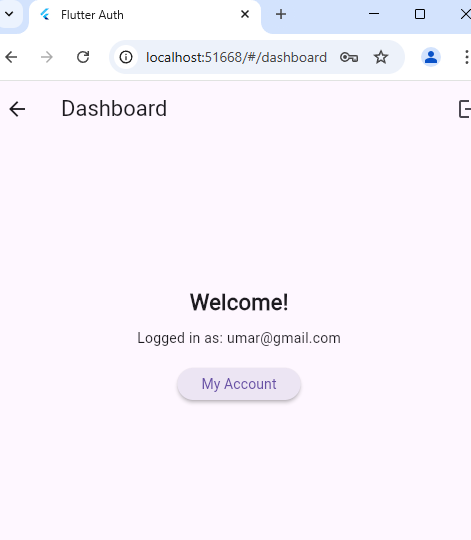
My Account Screen (lib/screens/my_account_screen.dart)
import 'package:flutter/material.dart';
import '../services/api_service.dart';
import '../models/user_model.dart';

class MyAccountScreen extends StatefulWidget {
  const MyAccountScreen({super.key});

  @override
  _MyAccountScreenState createState() => _MyAccountScreenState();
}

class _MyAccountScreenState extends State<MyAccountScreen> {
  User? user;

  @override
  void initState() {
    super.initState();
    fetchUserData();
  }

  void fetchUserData() async {
    User? userData = await ApiService.getUserDetails();
    setState(() {
      user = userData;
    });
  }

  @override
  Widget build(BuildContext context) {
    return Scaffold(
      appBar: AppBar(title: Text("My Account")),
      body: user == null
          ? Center(child: CircularProgressIndicator())
          : Padding(
              padding: EdgeInsets.all(16.0),
              child: Column(
                children: [
                  Text("Email: ${user!.email}"),
                  Text("First Name: ${user!.firstName}"),
                  Text("Last Name: ${user!.lastName}"),
                  Text("City: ${user!.city}"),
                ],
              ),
            ),
    );
  }
}
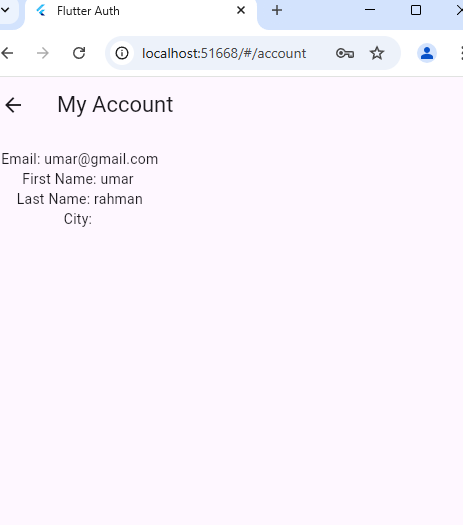
pubspec.yaml
name: register_login
description: "A new Flutter project."
# The following line prevents the package from being accidentally published to
# pub.dev using `flutter pub publish`. This is preferred for private packages.
publish_to: 'none' # Remove this line if you wish to publish to pub.dev

# The following defines the version and build number for your application.
# A version number is three numbers separated by dots, like 1.2.43
# followed by an optional build number separated by a +.
# Both the version and the builder number may be overridden in flutter
# build by specifying --build-name and --build-number, respectively.
# In Android, build-name is used as versionName while build-number used as versionCode.
# Read more about Android versioning at https://developer.android.com/studio/publish/versioning
# In iOS, build-name is used as CFBundleShortVersionString while build-number is used as CFBundleVersion.
# Read more about iOS versioning at
# https://developer.apple.com/library/archive/documentation/General/Reference/InfoPlistKeyReference/Articles/CoreFoundationKeys.html
# In Windows, build-name is used as the major, minor, and patch parts
# of the product and file versions while build-number is used as the build suffix.
version: 1.0.0+1

environment:
  sdk: ^3.6.1

# Dependencies specify other packages that your package needs in order to work.
# To automatically upgrade your package dependencies to the latest versions
# consider running `flutter pub upgrade --major-versions`. Alternatively,
# dependencies can be manually updated by changing the version numbers below to
# the latest version available on pub.dev. To see which dependencies have newer
# versions available, run `flutter pub outdated`.
dependencies:
  flutter:
    sdk: flutter

  # The following adds the Cupertino Icons font to your application.
  # Use with the CupertinoIcons class for iOS style icons.
  cupertino_icons: ^1.0.8
  shared_preferences: ^2.5.1
  http: ^1.3.0

dev_dependencies:
  flutter_test:
    sdk: flutter

  # The "flutter_lints" package below contains a set of recommended lints to
  # encourage good coding practices. The lint set provided by the package is
  # activated in the `analysis_options.yaml` file located at the root of your
  # package. See that file for information about deactivating specific lint
  # rules and activating additional ones.
  flutter_lints: ^5.0.0

# For information on the generic Dart part of this file, see the
# following page: https://dart.dev/tools/pub/pubspec

# The following section is specific to Flutter packages.
flutter:

  # The following line ensures that the Material Icons font is
  # included with your application, so that you can use the icons in
  # the material Icons class.
  uses-material-design: true

  # To add assets to your application, add an assets section, like this:
  # assets:
  #   - images/a_dot_burr.jpeg
  #   - images/a_dot_ham.jpeg

  # An image asset can refer to one or more resolution-specific "variants", see
  # https://flutter.dev/to/resolution-aware-images

  # For details regarding adding assets from package dependencies, see
  # https://flutter.dev/to/asset-from-package

  # To add custom fonts to your application, add a fonts section here,
  # in this "flutter" section. Each entry in this list should have a
  # "family" key with the font family name, and a "fonts" key with a
  # list giving the asset and other descriptors for the font. For
  # example:
  # fonts:
  #   - family: Schyler
  #     fonts:
  #       - asset: fonts/Schyler-Regular.ttf
  #       - asset: fonts/Schyler-Italic.ttf
  #         style: italic
  #   - family: Trajan Pro
  #     fonts:
  #       - asset: fonts/TrajanPro.ttf
  #       - asset: fonts/TrajanPro_Bold.ttf
  #         weight: 700
  #
  # For details regarding fonts from package dependencies,
  # see https://flutter.dev/to/font-from-package
Summary
In this guide, we built a Flutter authentication system using PHP, MySQL, and SharedPreferences. The app allows users to register, log in, and access protected pages like the Dashboard and My Account. The session is maintained using SharedPreferences, ensuring users stay logged in. With this setup, you now have a fully functional authentication flow for your Flutter app!





