
Chapter 2: Understanding Modules in Zend Framework 3
✅ What is a Module?
In Zend Framework 3, the entire application is divided into modules.
Each module is like a small application that contains everything needed for one feature:
- Controllers → contain the logic
- Views → templates for output
- Config → routes and setup
- Models/Services → business logic
👉 Example:
Applicationmodule → default app codeBlogmodule → blog postsUsermodule → authentication
✅ Default Project Structure
When you install the Skeleton Application, you will see one module called Application:
/module
  /Application
    /config
      module.config.php
    /src
      /Controller
      /Service
    /view
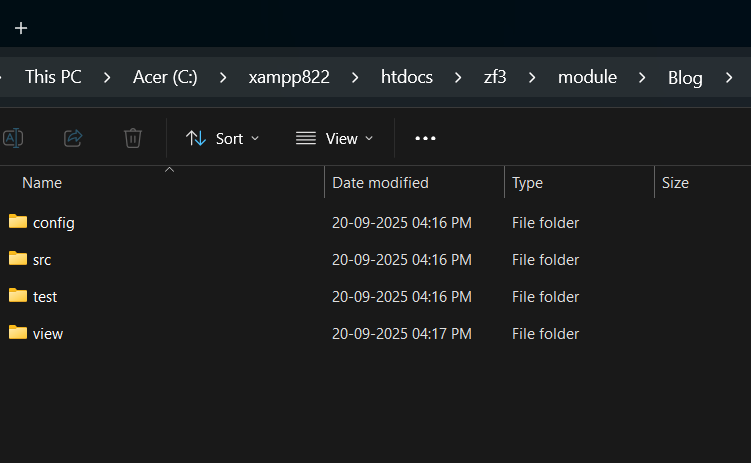
- config/module.config.php → routes, controllers, view settings
- src/ → PHP classes (controllers, services, models)
- view/ → view templates (.phtml files)
✅ The module.config.php File
The module.config.php file stores all configuration for that module:
<?php use Laminas\Router\Http\Literal;
use Laminas\Router\Http\Segment;
use Laminas\ServiceManager\Factory\InvokableFactory;
 return [ 'router' => [
        'routes' => [
            'home' => [
                'type'    => Literal::class,
                'options' => [
                    'route'    => '/',
                    'defaults' => [
                        'controller' => Controller\IndexController::class,
                        'action'     => 'index',
                    ],
                ],
            ],
            'blog' => [
                'type'    => Segment::class,
                'options' => [
                    'route'    => '/blog[/:action]',
                    'defaults' => [
                        'controller' => Controller\IndexController::class,
                        'action'     => 'index',
                    ],
                ],
            ],
        ],
    ],

    'controllers' => [
        'factories' => [
            Controller\IndexController::class => InvokableFactory::class,
        ],
    ],

    'view_manager' => [
        'display_not_found_reason' => true,
        'display_exceptions'       => true,
        'doctype'                  => 'HTML5',
        'not_found_template'       => 'error/404',
        'exception_template'       => 'error/index',
        'template_map' => [
            'layout/layout'     => __DIR__ . '/../view/layout/layout.phtml',
            'blog/index/index'  => __DIR__ . '/../view/blog/index/index.phtml',
            'error/404'         => __DIR__ . '/../view/error/404.phtml',
            'error/index'       => __DIR__ . '/../view/error/index.phtml',
        ],
        'template_path_stack' => [
            __DIR__ . '/../view',
        ],
    ],
];
✅ Creating a New Module (Example: Blog)
Follow these steps to create a new Blog module:
Step 1: Create folder structure
cd module
mkdir Blog
cd Blog
mkdir config src view
Step 2: module.config.php
<?php

declare(strict_types=1);

namespace Blog;
 use Laminas\Router\Http\Literal;
use Laminas\Router\Http\Segment;
use Laminas\ServiceManager\Factory\InvokableFactory;
return [ 'router' => [
        'routes' => [
            'home' => [
                'type'    => Literal::class,
                'options' => [
                    'route'    => '/',
                    'defaults' => [
                        'controller' => Controller\IndexController::class,
                        'action'     => 'index',
                    ],
                ],
            ],
            'blog' => [   // <- changed route key 'type' => Segment::class,
                'options' => [
                    'route'    => '/blog[/:action]',  // <- changed route 'defaults' => [
                        'controller' => Controller\IndexController::class,
                        'action'     => 'index',
                    ],
                ],
            ],
        ],
    ],
    'controllers' => [
        'factories' => [
            Controller\IndexController::class => InvokableFactory::class,
        ],
    ],
    'view_manager' => [
        'display_not_found_reason' => true,
        'display_exceptions'       => true,
        'doctype'                  => 'HTML5',
        'not_found_template'       => 'error/404',
        'exception_template'       => 'error/index',
        'template_map' => [
            'layout/layout'           => __DIR__ . '/../view/layout/layout.phtml',
            'blog/index/index'        => __DIR__ . '/../view/blog/index/index.phtml',  // <- changed 'error/404' => __DIR__ . '/../view/error/404.phtml',
            'error/index'             => __DIR__ . '/../view/error/index.phtml',
        ],
        'template_path_stack' => [
            __DIR__ . '/../view',
        ],
    ],
];
blog/src/module.php
<?php

declare(strict_types=1);

namespace Blog;

class Module
{
    public function getConfig(): array
    {
        /** @var array $config */
        $config = include __DIR__ . '/../config/module.config.php';
        return $config;
    }
}
Step 4: Controller
Blog/src/controller/IndexController.php
use Laminas\View\Model\ViewModel;
class IndexController extends AbstractActionController
{
public function indexAction()
{
return new ViewModel();
}
}
Step 4: View Files
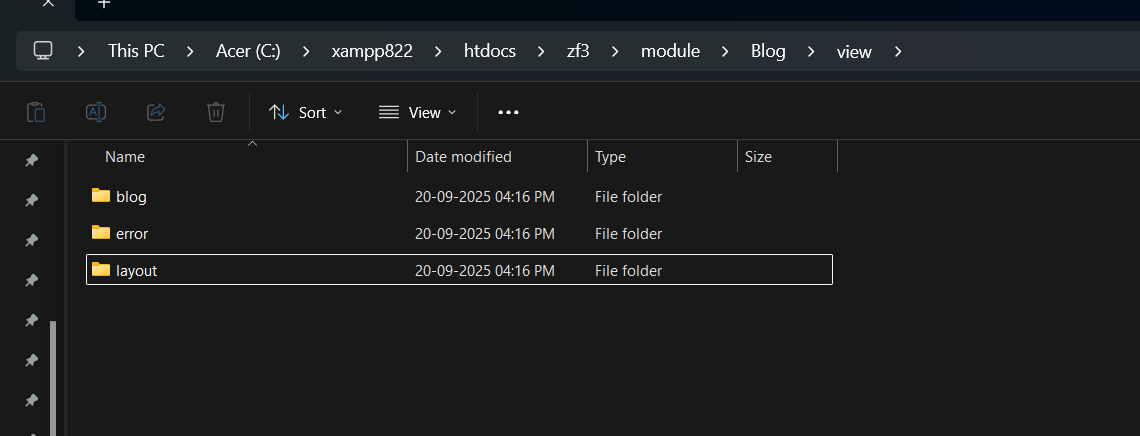
view/blog/index/index.phtml
Welcome to Blog Page
Layout
<?php
/**
* @var Laminas\View\Renderer\PhpRenderer $this
*/
?>
<?= $this->doctype() ?>
<html lang="en">
<head>
<meta charset="utf-8">
<?= $this->headTitle('Laminas MVC Skeleton')->setSeparator(' - ')->setAutoEscape(false) ?>
<?= $this->headMeta()
->appendName('viewport', 'width=device-width, initial-scale=1.0')
->appendHttpEquiv('X-UA-Compatible', 'IE=edge')
?>
<!-- Styles -->
<?= $this->headLink([
'rel' => 'shortcut icon',
'type' => 'image/vnd.microsoft.icon',
'href' => $this->basePath() . '/img/favicon.ico'
])
->prependStylesheet($this->basePath('css/style.css'))
->prependStylesheet($this->basePath('css/bootstrap.min.css')) ?>
<!-- Scripts -->
<?= $this->headScript() ?>
</head>
<body>
<nav class="navbar navbar-expand-md navbar-dark mb-4" role="navigation">
<div class="container">
<a class="navbar-brand" href="<?= $this->url('home') ?>">
<img src="<?= $this->basePath('img/laminas-logo.svg') ?>" alt="Laminas">
<span class="navbar-text text-light">MVC Skeleton</span>
</a>
<button
class="navbar-toggler"
type="button"
data-bs-toggle="collapse"
data-bs-target="#navbarSupportedContent"
aria-controls="navbarSupportedContent"
aria-expanded="false"
aria-label="Toggle navigation"
>
<span class="navbar-toggler-icon"></span>
</button>
<div class="collapse navbar-collapse" id="navbarSupportedContent">
<ul class="navbar-nav ms-auto">
<li class="nav-item">
<a
class="nav-link active"
aria-current="page"
href="<?= $this->url('home') ?>"
>Home
</a>
</li>
</ul>
</div>
</div>
</nav>
<div class="container">
<?= $this->content ?>
<hr>
<footer>
<p>
© <?= date('Y') ?>
<a href="https://getlaminas.org/">Laminas Project</a> a Series of LF Projects, LLC.
</p>
</footer>
</div>
<?= $this->inlineScript()
->prependFile($this->basePath('js/bootstrap.min.js')) ?>
</body>
</html>
Step 4: Register the Module
Add it inside config/modules.config.php:
return [
    'Laminas\Router',
    'Laminas\Validator',
    'Application',
    'Blog',   // ✅ add this line
];
✅ Best Practices
- Keep related functionality inside a single module.
- Re-use modules in multiple projects.
- Use meaningful names (e.g., Blog, User, Admin).
- Always separate concerns.
✅ Exercises
- Create a new
Usermodule with its ownModule.phpandmodule.config.php. - Register it in
modules.config.php. - Create a simple controller inside
Usermodule and test by adding a route.





