
Implementing Debounced Search and Global State Monitoring with BlocObserver
🧩 Overview
In this tutorial, you’ll learn how to build a Flutter app using the BLoC (Business Logic Component) pattern to manage state and handle user interactions efficiently. The primary focus of this tutorial is to demonstrate how to integrate debounced search functionality and global state monitoring through the use of BlocObserver.
You will start by building a Flutter application that fetches user data from a mock API (https://jsonplaceholder.typicode.com/users). The app will display a list of users and allow users to filter the list in real time with a search bar. To improve performance and user experience, the search input will be debounced, meaning that search results will only be triggered after the user stops typing for a set period.
The tutorial will guide you through creating a BLoC to manage the user data and the search logic. You’ll also learn how to set up BlocObserver to globally track all events, transitions, and errors in your application, which will help with debugging and state management. By the end of this tutorial, you’ll have a solid understanding of how to implement BLoC architecture with advanced features such as search debouncing and centralized state monitoring, enhancing both the user experience and your app’s maintainability.
In this tutorial, you’ll build a Flutter app that:
- Fetches user data from an API (
https://jsonplaceholder.typicode.com/users) - Implements search with debounce using BLoC
- Logs every event, transition, and error globally using
BlocObserver
Perfect for understanding advanced BLoC concepts in a real-world use case!
🏗️ Project Setup
- Create Flutter Project
flutter create bloc_user_search cd bloc_user_search - **Add Dependencies in **
dependencies:
  flutter:
    sdk: flutter
  flutter_bloc: ^8.1.2
  http: ^0.13.6
Then run:
flutter pub get
📦 Folder Structure
lib/
├── blocs/
│   ├── user_bloc.dart
│   ├── user_event.dart
│   ├── user_state.dart
├── models/
│   └── user_model.dart
├── services/
│   └── api_service.dart
├── observers/
│   └── app_bloc_observer.dart
├── screens/
│   └── user_list_screen.dart
└── main.dart
📌 Step 1: Create the User Model
lib/models/user_model.dart
class User {
  final int id;
  final String name;
  final String email;

  User({required this.id, required this.name, required this.email});

  factory User.fromJson(Map<String, dynamic> json) {
    return User(
      id: json['id'],
      name: json['name'],
      email: json['email'],
    );
  }
}
🌐 Step 2: Create the API Service
lib/services/api_service.dart
import 'dart:convert';
import 'package:http/http.dart' as http;
import '../models/user_model.dart';

class ApiService {
  static Future<List<User>> fetchUsers() async {
    final response = await http.get(Uri.parse('https://jsonplaceholder.typicode.com/users'));
    if (response.statusCode == 200) {
      final List data = json.decode(response.body);
      return data.map((json) => User.fromJson(json)).toList();
    } else {
      throw Exception('Failed to load users');
    }
  }
}
🔁 Step 3: Define BLoC Event and State
lib/blocs/user_event.dart
abstract class UserEvent {}

class LoadUsers extends UserEvent {}

class SearchUsers extends UserEvent {
  final String query;

  SearchUsers(this.query);
}
lib/blocs/user_state.dart
import '../models/user_model.dart';

abstract class UserState {}

class UserInitial extends UserState {}

class UserLoading extends UserState {}

class UserLoaded extends UserState {
  final List<User> users;
  UserLoaded(this.users);
}

class UserError extends UserState {
  final String message;
  UserError(this.message);
}
⚙️ Step 4: Create the BLoC with Debounce
lib/blocs/user_bloc.dart
import 'dart:async';
import 'package:flutter_bloc/flutter_bloc.dart';
import '../services/api_service.dart';
import '../models/user_model.dart';
import 'user_event.dart';
import 'user_state.dart';

class UserBloc extends Bloc<UserEvent, UserState> {
  List<User> _allUsers = [];
  Timer? _debounce;

  UserBloc() : super(UserInitial()) {
    on<LoadUsers>(_onLoadUsers);
    on<SearchUsers>(_onSearchUsers);
  }

  void _onLoadUsers(LoadUsers event, Emitter<UserState> emit) async {
    emit(UserLoading());
    try {
      _allUsers = await ApiService.fetchUsers();
      emit(UserLoaded(_allUsers));
    } catch (e) {
      emit(UserError(e.toString()));
    }
  }

  void _onSearchUsers(SearchUsers event, Emitter<UserState> emit) {
    if (_debounce?.isActive ?? false) _debounce!.cancel();
    _debounce = Timer(const Duration(milliseconds: 500), () {
      final results = _allUsers
          .where((user) => user.name.toLowerCase().contains(event.query.toLowerCase()))
          .toList();
      emit(UserLoaded(results));
    });
  }
}
👁️ Step 5: Global Bloc Observer
❓ What is BlocObserver?
BlocObserver is a global listener for all BLoCs in your app. It lets you:
- Monitor all events, state transitions, and errors
- Debug easily
- Track analytics
lib/observers/app_bloc_observer.dart
import 'package:flutter_bloc/flutter_bloc.dart';

class AppBlocObserver extends BlocObserver {
  @override
  void onEvent(Bloc bloc, Object? event) {
    super.onEvent(bloc, event);
    print('Bloc Event: $event');
  }

  @override
  void onTransition(Bloc bloc, Transition transition) {
    super.onTransition(bloc, transition);
    print('Bloc Transition: $transition');
  }

  @override
  void onError(BlocBase bloc, Object error, StackTrace stackTrace) {
    super.onError(bloc, error, stackTrace);
    print('Bloc Error: $error');
  }
}
Update main.dart
import 'package:flutter/material.dart';
import 'package:flutter_bloc/flutter_bloc.dart';
import 'blocs/user_bloc.dart';
import 'observers/app_bloc_observer.dart';
import 'screens/user_list_screen.dart';

void main() {
  Bloc.observer = AppBlocObserver(); // 🧠 Global BLoC logger
  runApp(const MyApp());
}

class MyApp extends StatelessWidget {
  const MyApp({super.key});

  @override
  Widget build(BuildContext context) {
    return MaterialApp(
      title: 'User Search BLoC',
      home: BlocProvider(
        create: (_) => UserBloc()..add(LoadUsers()),
        child: const UserListScreen(),
      ),
    );
  }
}
🖼️ Step 6: Create the UI
lib/screens/user_list_screen.dart
import 'package:flutter/material.dart';
import 'package:flutter_bloc/flutter_bloc.dart';
import '../blocs/user_bloc.dart';
import '../blocs/user_event.dart';
import '../blocs/user_state.dart';
import '../models/user_model.dart';

class UserListScreen extends StatefulWidget {
  const UserListScreen({super.key});

  @override
  State<UserListScreen> createState() => _UserListScreenState();
}

class _UserListScreenState extends State<UserListScreen> {
  final _controller = TextEditingController();

  @override
  Widget build(BuildContext context) {
    return Scaffold(
      appBar: AppBar(title: const Text('Search Users')),
      body: Column(
        children: [
          Padding(
            padding: const EdgeInsets.all(8),
            child: TextField(
              controller: _controller,
              onChanged: (query) {
                context.read<UserBloc>().add(SearchUsers(query));
              },
              decoration: const InputDecoration(
                hintText: 'Search by name',
                border: OutlineInputBorder(),
              ),
            ),
          ),
          Expanded(
            child: BlocBuilder<UserBloc, UserState>(
              builder: (context, state) {
                if (state is UserLoading) {
                  return const Center(child: CircularProgressIndicator());
                } else if (state is UserLoaded) {
                  return ListView.builder(
                    itemCount: state.users.length,
                    itemBuilder: (_, i) {
                      final user = state.users[i];
                      return ListTile(
                        title: Text(user.name),
                        subtitle: Text(user.email),
                      );
                    },
                  );
                } else if (state is UserError) {
                  return Center(child: Text(state.message));
                }
                return const SizedBox.shrink();
              },
            ),
          )
        ],
      ),
    );
  }
}
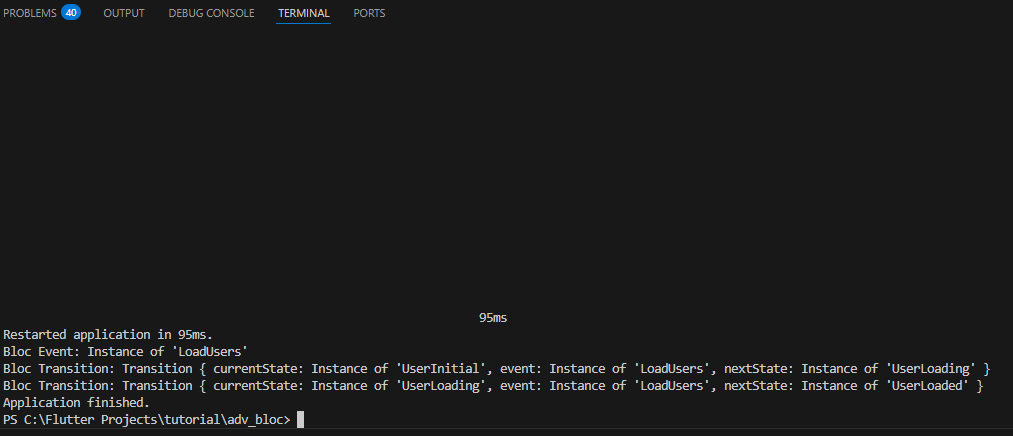
✅ Output
- A fully working BLoC architecture
- Debounced search for users
- Global logs for events, transitions, and errors using
BlocObserver
| Component | Purpose |
|---|---|
flutter_bloc |
Main package for implementing the BLoC pattern in Flutter |
hydrated_bloc |
Persists BLoC state automatically using local storage |
bloc_test |
Provides utilities to easily test BLoC logic |
equatable |
Helps with value comparison for states and events to reduce boilerplate |
bloc_concurrency |
Controls how concurrent events are processed (e.g., droppable, sequential) |
BlocObserver |
Globally observes and logs all BLoC events, transitions, and errors |





