
AI Reading
Quick summary of this article
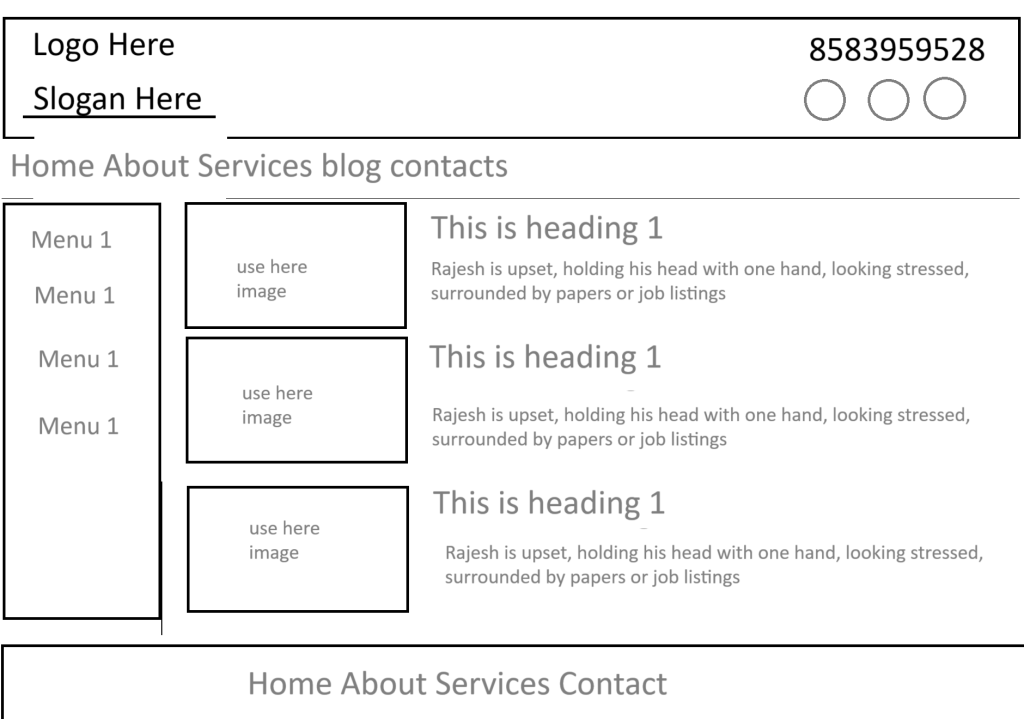
This tutorial walks through building a basic multi-page website with Laravel 11, covering installation, routing, controllers, and Blade templates. It shows how to create a static site with five pages—Home, About, Services, Blog, and Contact—that share a common layout with a header, navigation menu, sidebar, and footer.
- Install Laravel 11 using the command
composer create-project laravel/laravel myproject, then navigate into the project folder. - Define five routes in
routes/web.phpthat point to methods in aPageController, one for each page. - Generate the controller with
php artisan make:controller PageControllerand add methods that pass title and content data to views usingcompact(). - Create a master layout file (
layout.blade.php) containing the site header, navigation links, sidebar menu, and footer, which all pages extend. - Build individual Blade view files for each page that use
@extends('layout')and@section('content')to insert unique content into the shared layout.
# Laravel 11 Tutorial: Creating a Basic Website Layout
Introduction
Laravel is a powerful PHP framework designed to make web development easier and more efficient. In this tutorial, we will create a basic multi-page website using Laravel 11. This website will include a navigation menu, a sidebar, and different sections for Home, About, Services, Blog, and Contact.
Installing Laravel 11
To start, install Laravel 11 by running the following command in your terminal:
composer create-project laravel/laravel myprojectNavigate into your project folder:
cd myprojectSetting Up Routes
Open routes/web.php and define routes for your pages:
use Illuminate\Support\Facades\Route;
use App\Http\Controllers\PageController;

Route::get('/', [PageController::class, 'home']);
Route::get('/about', [PageController::class, 'about']);
Route::get('/services', [PageController::class, 'services']);
Route::get('/blog', [PageController::class, 'blog']);
Route::get('/contact', [PageController::class, 'contact']);
Creating the Controller
Generate a controller by running:
php artisan make:controller PageControllerThen, define methods inside app/Http/Controllers/PageController.php:
namespace App\Http\Controllers;
use Illuminate\Http\Request;

class PageController extends Controller {
  public function home() {
    $title = 'Home Page';
    $content = 'Welcome to our homepage!';
    return view('home', compact('title', 'content'));
  }

  public function about() {
    $title = 'About Us';
    $content = 'Information about our company.';
    return view('about', compact('title', 'content'));
  }

  public function services() {
    $title = 'Our Services';
    $content = 'Details of the services we offer.';
    return view('services', compact('title', 'content'));
  }

  public function blog() {
    $title = 'Blog';
    $content = 'Latest news and updates.';
    return view('blog', compact('title', 'content'));
  }

  public function contact() {
    $title = 'Contact Us';
    $content = 'How to get in touch with us.';
    return view('contact', compact('title', 'content'));
  }
}
Creating the Layout
Create a layout file in resources/views/layout.blade.php:
<!DOCTYPE html>
<html>
<head>
  <title>{{ $title ?? 'My Laravel Project' }}</title>
  <link rel="stylesheet" href="{{ asset('css/style.css') }}">
</head>
<body>

<header>
  <div class="logo">Logo Here</div>
  <div class="slogan">Slogan Here</div>
  <div class="contact">8583959528</div>
</header>

<nav>
  <a href="/">Home</a>
  <a href="/about">About</a>
  <a href="/services">Services</a>
  <a href="/blog">Blog</a>
  <a href="/contact">Contact</a>
</nav>

<main>
  <aside>
    <a href="#">Menu 1</a>
    <a href="#">Menu 2</a>
    <a href="#">Menu 3</a>
    <a href="#">Menu 4</a>
  </aside>
  <section>
    <h1>{{ $title }}</h1>
    @yield('content')
  </section>
</main>

<footer>
  Home About Services Contact
</footer>

</body>
</html>
Creating the Views
Create the following Blade template files inside resources/views/:
home.blade.php
@extends('layout')
@section('content')
  <div class="image-box">Use here image</div>
  <p>{{ $content }}</p>
@endsection
about.blade.php
@extends('layout')
@section('content')
  <p>{{ $content }}</p>
@endsection
services.blade.php
@extends('layout')
@section('content')
  <p>{{ $content }}</p>
@endsection
blog.blade.php
@extends('layout')
@section('content')
  <p>{{ $content }}</p>
@endsection
contact.blade.php
@extends('layout')
@section('content')
  <p>{{ $content }}</p>
@endsection
Summary
- Installing Laravel 11
- Setting up routes
- Creating a controller
- Building a layout with Blade
- Passing data from the controller to views using
compact()
This setup provides a simple, extendable structure for building a Laravel website. You can now expand on this by adding more features like authentication, database integration, and dynamic content handling.