AI Reading
Quick summary of this article
This Flutter tutorial explains how to implement a debounced search feature that filters user data from the JSONPlaceholder API. Debouncing prevents excessive network requests by waiting until the user stops typing for 500 milliseconds before performing the search. The app fetches user data, displays it in a list, and allows filtering by name, username, email, city, or company.
- The app uses a custom Debouncer utility class that delays the search action by 500ms after the user stops typing.
- User data is fetched from the JSONPlaceholder API and parsed into a User model with fields for id, name, username, email, city, and company.
- The search filters users in real-time based on multiple fields: name, username, email, city, or company name.
- Dependencies include http for API calls, flutter_bloc and hydrated_bloc for state management, and path_provider for local storage.
- The UI consists of a search bar at the top and a scrollable list of users that updates as the user types with debounced filtering.
In modern mobile apps, especially those with dynamic search features, debouncing is crucial to avoid sending too many network requests while the user types. In this tutorial, you’ll learn how to implement a debounced search in Flutter by fetching data from the https://jsonplaceholder.typicode.com/users API.
We will:
- Fetch and display user data.
- Add a search input with debounce delay.
- Filter users by name, username, email, city, or company.
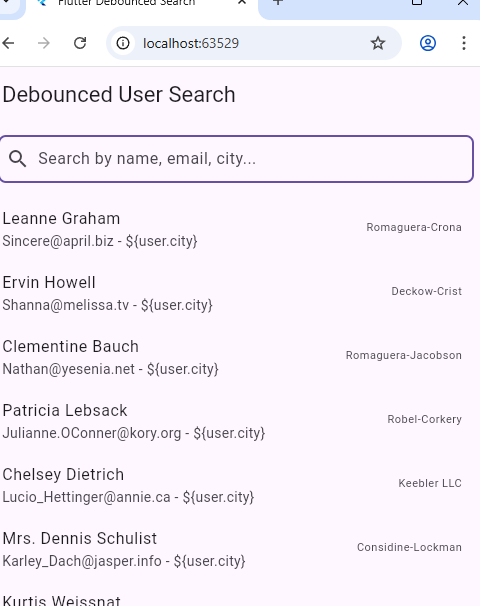
🚀 Final Preview
We’ll build a simple screen with:
- A search bar at the top
- A list of users below
- Debounced filtering as you type
🧰 Step 1: Set Up Dependencies
In pubspec.yaml:
dependencies:
  flutter:
    sdk: flutter


  # The following adds the Cupertino Icons font to your application.
  # Use with the CupertinoIcons class for iOS style icons.
  cupertino_icons: ^1.0.8
  flutter_bloc: ^9.1.0
  hydrated_bloc: ^10.0.0
  path_provider: ^2.0.15
  http: ^1.4.0
Run:
flutter pub get🏗️ Step 2: Create the User Model
Create a file models/user_model.dart:
class User {
  final int id;
  final String name;
  final String username;
  final String email;
  final String city;
  final String company;

  User({
    required this.id,
    required this.name,
    required this.username,
    required this.email,
    required this.city,
    required this.company,
  });

  factory User.fromJson(Map<String, dynamic> json) {
    return User(
      id: json['id'],
      name: json['name'],
      username: json['username'],
      email: json['email'],
      city: json['address']['city'],
      company: json['company']['name'],
    );
  }
}
🌐 Step 3: Create the API Service
Create a file services/api_service.dart:
import 'dart:convert';
import 'package:http/http.dart' as http;
import '../models/user_model.dart';

class ApiService {
  static const String url = 'https://jsonplaceholder.typicode.com/users';

  static Future<List<User>> fetchUsers() async {
    final response = await http.get(Uri.parse(url));
    if (response.statusCode == 200) {
      final List jsonData = json.decode(response.body);
      return jsonData.map((user) => User.fromJson(user)).toList();
    } else {
      throw Exception('Failed to load users');
    }
  }
}
⏳ Step 4: Add Debounce Utility
Create a utility utils/debouncer.dart:
import 'dart:async';

import 'package:flutter/foundation.dart';

class Debouncer {
  final int milliseconds;
  VoidCallback? action;
  Timer? _timer;

  Debouncer({this.milliseconds = 500});

  run(VoidCallback action) {
    _timer?.cancel();
    _timer = Timer(Duration(milliseconds: milliseconds), action);
  }
}
🖼️ Step 5: Build the UI with Debounced Search
Create a screen screens/user_list_screen.dart:
import 'package:flutter/material.dart';
import '../models/user_model.dart';
import '../services/api_service.dart';
import '../utils/debouncer.dart';

class UserListScreen extends StatefulWidget {
  const UserListScreen({Key? key}) : super(key: key);

  @override
  _UserListScreenState createState() => _UserListScreenState();
}

class _UserListScreenState extends State<UserListScreen> {
  final Debouncer _debouncer = Debouncer(milliseconds: 500);
  List<User> _users = [];
  List<User> _filteredUsers = [];
  bool _isLoading = true;

  @override
  void initState() {
    super.initState();
    _loadUsers();
  }

  void _loadUsers() async {
    final users = await ApiService.fetchUsers();
    setState(() {
      _users = users;
      _filteredUsers = users;
      _isLoading = false;
    });
  }

  void _filterUsers(String query) {
    _debouncer.run(() {
      final filtered = _users.where((user) {
        final lowerQuery = query.toLowerCase();
        return user.name.toLowerCase().contains(lowerQuery) ||
            user.username.toLowerCase().contains(lowerQuery) ||
            user.email.toLowerCase().contains(lowerQuery) ||
            user.city.toLowerCase().contains(lowerQuery) ||
            user.company.toLowerCase().contains(lowerQuery);
      }).toList();

      setState(() {
        _filteredUsers = filtered;
      });
    });
  }

  @override
  Widget build(BuildContext context) {
    return Scaffold(
      appBar: AppBar(title: Text('Debounced User Search')),
      body: _isLoading
          ? Center(child: CircularProgressIndicator())
          : Column(
              children: [
                Padding(
                  padding: const EdgeInsets.all(12.0),
                  child: TextField(
                    onChanged: _filterUsers,
                    decoration: InputDecoration(
                      hintText: 'Search by name, email, city...',
                      prefixIcon: Icon(Icons.search),
                      border: OutlineInputBorder(
                          borderRadius: BorderRadius.circular(8)),
                    ),
                  ),
                ),
                Expanded(
                  child: ListView.builder(
                    itemCount: _filteredUsers.length,
                    itemBuilder: (context, index) {
                      final user = _filteredUsers[index];
                      return ListTile(
                        title: Text(user.name),
                        subtitle: Text('${user.email} - \${user.city}'),
                        trailing: Text(user.company),
                      );
                    },
                  ),
                )
              ],
            ),
    );
  }
}
📱 Step 6: Add to main.dart
import 'package:flutter/material.dart';
import 'screens/user_list_screen.dart';

void main() {
  runApp(const MyApp());
}

class MyApp extends StatelessWidget {
  const MyApp({super.key});

  @override
  Widget build(BuildContext context) {
    return MaterialApp(
      title: 'Flutter Debounced Search',
      theme: ThemeData(primarySwatch: Colors.blue),
      home: const UserListScreen(),
      debugShowCheckedModeBanner: false,
    );
  }
}
✅ Done! Run the App
Now launch the app:
flutter runStart typing in the search bar — you’ll notice it only triggers filtering after you pause typing for 500ms.