
AI Reading
Quick summary of this article
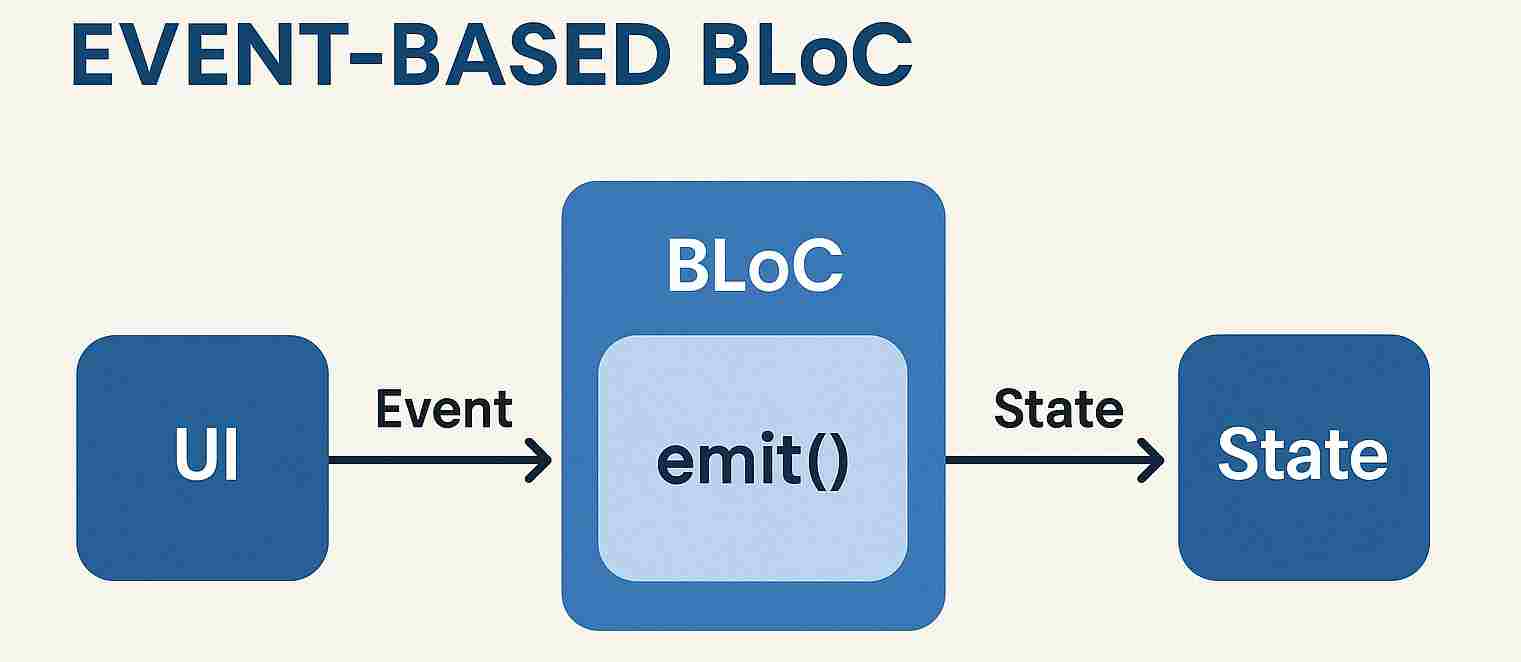
This tutorial explains how to build an event-based BLoC (Business Logic Component) in Flutter, using a YouTube subscriber counter app as an example. Unlike Cubit, BLoC uses events to trigger state changes, which helps separate UI actions from business logic and is ideal for handling multiple event types or complex workflows. The article walks through defining events and states, creating the BLoC class, and integrating it with the UI using providers, builders, and event triggering.
- Core BLoC components: Events represent actions (like Subscribe/Unsubscribe), States hold the current data (like subscriber count), and the BLoC class uses
on<Event>()handlers withemit()to update the state. - UI integration: The
BlocProvidersupplies the BLoC to the widget tree,BlocBuilderrebuilds the UI when the state changes, andcontext.read().add()triggers events from buttons. - BlocConsumer: The example uses
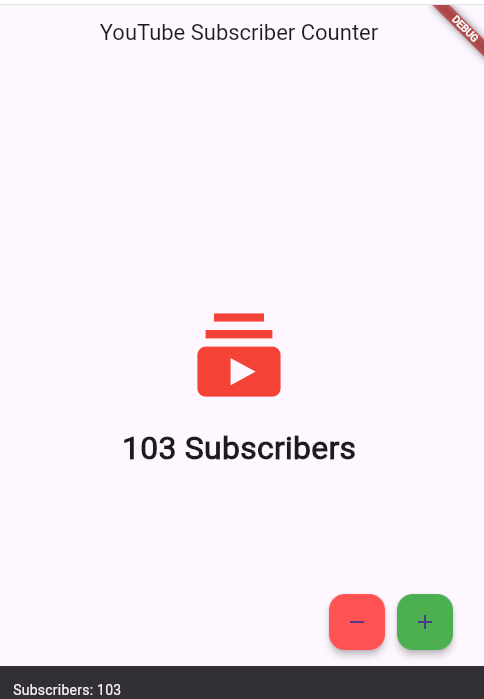
BlocConsumerwhich combines both a listener (for side effects like showing SnackBars) and a builder (for rendering the UI), allowing the app to show notifications when the subscriber count changes. - Practical example: The app starts with 100 subscribers, and users can increment or decrement the count via floating action buttons, with a warning SnackBar displayed when the count reaches zero.
- Next steps: The tutorial previews Part 6, which will cover
BlocListenerandBlocConsumerin more depth for handling alerts and combining listeners with UI builders.
🧠 What is Event-Based BLoC?
Unlike Cubit, the BLoC pattern uses events to trigger state changes, making it ideal when:
- ✅ You have multiple event types
- ✅ You want to separate UI actions from business logic
- ✅ You’re dealing with asynchronous or complex workflows
🎯 Let’s Build a Subscriber App with BLoC
lib/
├── bloc/
│   ├── subscriber_bloc.dart
│   ├── subscriber_event.dart
│   └── subscriber_state.dart
└── main.dart
🔹 Step 1: Define Events
📁 lib/bloc/subscriber_event.dart
abstract class SubscriberEvent {}

class Subscribe extends SubscriberEvent {}

class Unsubscribe extends SubscriberEvent {}
🔹 Step 2: Define States
📁 lib/bloc/subscriber_state.dart
class SubscriberState {
  final int count;

  SubscriberState(this.count);
}
🔹 Step 3: Create the BLoC
📁 lib/bloc/subscriber_bloc.dart
import 'package:flutter_bloc/flutter_bloc.dart';
import 'subscriber_event.dart';
import 'subscriber_state.dart';

class SubscriberBloc extends Bloc<SubscriberEvent, SubscriberState> {
  SubscriberBloc() : super(SubscriberState(100)) {
    on((event, emit) {
      emit(SubscriberState(state.count + 1));
    });

    on((event, emit) {
      emit(SubscriberState(state.count > 0 ? state.count - 1 : 0));
    });
  }
}
🧩 UI Integration
🔸 Provide the BLoC
📍 In your main widget tree:
BlocProvider(
  create: (context) => SubscriberBloc(),
  child: SubscriberPage(),
)
🔸 Show the State
📍 Inside the widget build method:
BlocBuilder<SubscriberBloc, SubscriberState>(
  builder: (context, state) {
    final count = (state as SubscriberValue).count;
    return Text('Count: \$count', style: TextStyle(fontSize: 30));
  },
)
🔸 Trigger Events
📍 Buttons to interact with BLoC:
FloatingActionButton(
 onPressed: () {
                context.read().add(bscribe());
              },
  child: Icon(Icons.add),
),

FloatingActionButton(
 onPressed: () {
                context.read().add(Unsubscribe());
              },
  child: Icon(Icons.remove),
),
📍 Main.dart:
import 'package:flutter/material.dart';
import 'package:flutter_bloc/flutter_bloc.dart';
import 'bloc/subscriber_bloc.dart';
import 'bloc/subscriber_event.dart';
import 'bloc/subscriber_state.dart';

void main() {
  runApp(SubscriberApp());
}

class SubscriberApp extends StatelessWidget {
  @override
  Widget build(BuildContext context) {
    return MaterialApp(
      title: 'YouTube Subscriber Counter',
      theme: ThemeData(
        primarySwatch: Colors.red,
      ),
      home: BlocProvider(
        create: (_) => SubscriberBloc(),
        child: SubscriberPage(),
      ),
    );
  }
}

class SubscriberPage extends StatelessWidget {
  @override
  Widget build(BuildContext context) {
    return Scaffold(
      appBar: AppBar(
        title: Text('YouTube Subscriber Counter'),
        centerTitle: true,
      ),
      body: BlocConsumer<SubscriberBloc, SubscriberState>(
        listener: (context, state) {
          if (state.count == 0) {
            ScaffoldMessenger.of(context).showSnackBar(
              SnackBar(
                content: Text('No more subscribers left!'),
                backgroundColor: Colors.red,
                duration: Duration(seconds: 2),
              ),
            );
          } else {
            ScaffoldMessenger.of(context).showSnackBar(
              SnackBar(
                content: Text('Subscribers: ${state.count}'),
                duration: Duration(milliseconds: 800),
              ),
            );
          }
        },
        builder: (context, state) {
          return Center(
            child: Column(
              mainAxisAlignment: MainAxisAlignment.center,
              children: [
                Icon(Icons.subscriptions, size: 100, color: Colors.red),
                SizedBox(height: 20),
                Text(
                  '${state.count} Subscribers',
                  style: TextStyle(fontSize: 32, fontWeight: FontWeight.bold),
                ),
              ],
            ),
          );
        },
      ),
      floatingActionButton: Padding(
        padding: const EdgeInsets.only(right: 20.0),
        child: Row(
          mainAxisAlignment: MainAxisAlignment.end,
          children: [
            FloatingActionButton(
              heroTag: 'unsubscribe',
              onPressed: () {
                context.read().add(Unsubscribe());
              },
              child: Icon(Icons.remove),
              tooltip: 'Unsubscribe',
              backgroundColor: Colors.redAccent,
            ),
            SizedBox(width: 12),
            FloatingActionButton(
              heroTag: 'subscribe',
              onPressed: () {
                context.read().add(Subscribe());
              },
              child: Icon(Icons.add),
              tooltip: 'Subscribe',
              backgroundColor: Colors.green,
            ),
          ],
        ),
      ),
    );
  }
}
✅ Summary
| Concept | Description |
|---|---|
Event |
What happened (e.g., Increment) |
State |
The current UI/data state |
on<Event>() |
Event handler in your BLoC |
emit() |
Sends new state to the UI |
BlocBuilder |
Rebuilds UI on state change |
context.read().add() |
Triggers events from the UI |
🚀 Coming Up Next:
Part 6 – BlocListener and BlocConsumer
Learn how to listen to BLoC changes (e.g., showing Snackbars or Alerts) and combine listeners + UI builders.