Module 16: Production ML Engineering, MLOps & Capstone Projects

Module 16: Production ML Engineering, MLOps & Capstone Projects

AI Reading

Quick summary of this article

Preparing the AI summary…

PyTorch 2.x Production Engineering Masterclass • Chapter 16 of 16 (Grand Finale)

Production ML Engineering, MLOps & Grand Capstones

Cross the bridge from research modeling to enterprise production operations. Master high-concurrency model serving backends (NVIDIA Triton, vLLM PagedAttention, TorchServe, FastAPI), dynamic request batching algorithms, hardened multi-stage Docker containerization, Prometheus and Grafana telemetry observability, automated data drift detection, and deliver the five definitive industry-standard capstone engineering solutions.

Prerequisites: Chapters 1–15 complete (Core PyTorch, Distributed Training, Compilers & Model Export)
•
Estimated Study Time: 6.0 Hours (Architecture Deep-Dive + 5 Labs + 5 Grand Capstones)

1. Technical Audit: Prototyping Scripts vs. Enterprise Production ML

Over 85% of machine learning models developed in Jupyter notebooks never make it to production. When naive Python serving scripts are deployed under real-world traffic, they collapse due to Python Global Interpreter Lock (GIL) thread contention, lack of request batching, unmonitored data distribution drift, and missing container security isolation. Production ML engineering demands an industrial architectural foundation.
Dimension Ad-Hoc Prototyping (Academic / Lab) Enterprise Production Engineering (MLOps) Production Impact
Inference Execution Synchronous sequential evaluation in Flask / Eager Python loop Dynamic batching queues + C++ Triton / vLLM continuous batching 10x to 40x higher GPU saturation; sub-15ms amortized per-request latency.
Concurrency & GIL Python GIL blocks worker threads; high latency spikes on multi-core Async epoll event loops, multi-worker IPC, C++ inference threads Linear multi-core CPU scaling with zero GIL serialization bottlenecks.
Containerization Bloated 12GB root containers containing compilers, git, and dev wheels Hardened multi-stage Docker build, non-root user (1001:1001), <1.8GB image Zero root CVE vulnerabilities; 5x faster Kubernetes pod startup time.
Observability & Telemetry Ad-hoc print() logging and unmonitored stdout terminal output Prometheus metrics (P50/P90/P99 histograms), Grafana dashboards, AlertManager Guaranteed SLA adherence; automated alerting on latency regression.
Data Drift & Quality Ignored until customer complaints report degradation Automated statistical tests (Kolmogorov-Smirnov & PSI) on live inputs Automated triggers for retraining pipelines prior to accuracy failure.
Release Engineering Manual SSH file overwrite (scp model.pt server:/app) causing downtime Canary traffic shifting (10% → 50% → 100%) with automated health rollback Zero customer downtime; instant automatic rollback upon canary failure.

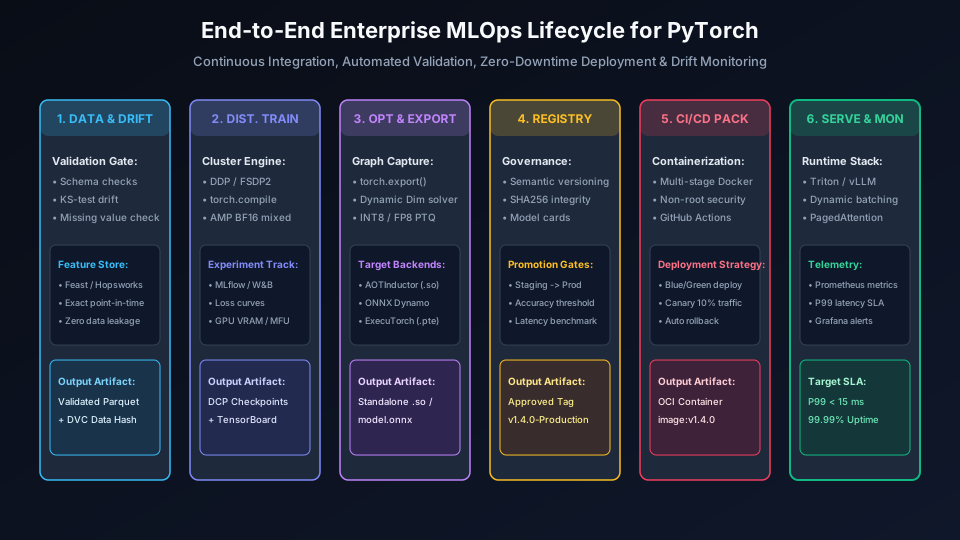
End-to-End Enterprise MLOps Lifecycle for PyTorch
Figure 16.1: The six stages of the enterprise PyTorch MLOps lifecycle: Data validation, distributed training, compiler export, model registry, containerized CI/CD, and telemetry serving.

2. Production Model Serving Architectures: From FastAPI to Triton & vLLM

Selecting the correct inference serving runtime dictates the cost, throughput, and reliability of your AI infrastructure. The four primary enterprise architectural options serve distinct operational requirements:
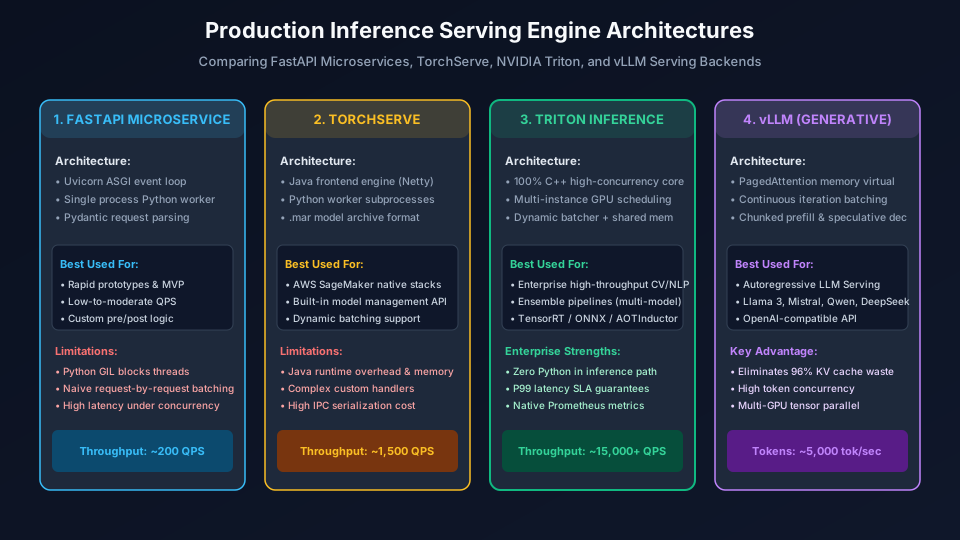
Production Inference Serving Engine Architectures
Figure 16.2: Architectural comparison of the four major inference runtimes: FastAPI microservices, TorchServe, NVIDIA Triton Inference Server, and vLLM.

2.1 The Mathematics of Dynamic Request Batching

Modern GPUs (such as NVIDIA H100 or A100) achieve maximum floating-point efficiency when executing large matrix multiplications (GEMMs) that fill all Streaming Multiprocessors (SMs). Executing requests one by one (batch size $N=1$) under-utilizes memory bandwidth and wastes compute capacity.

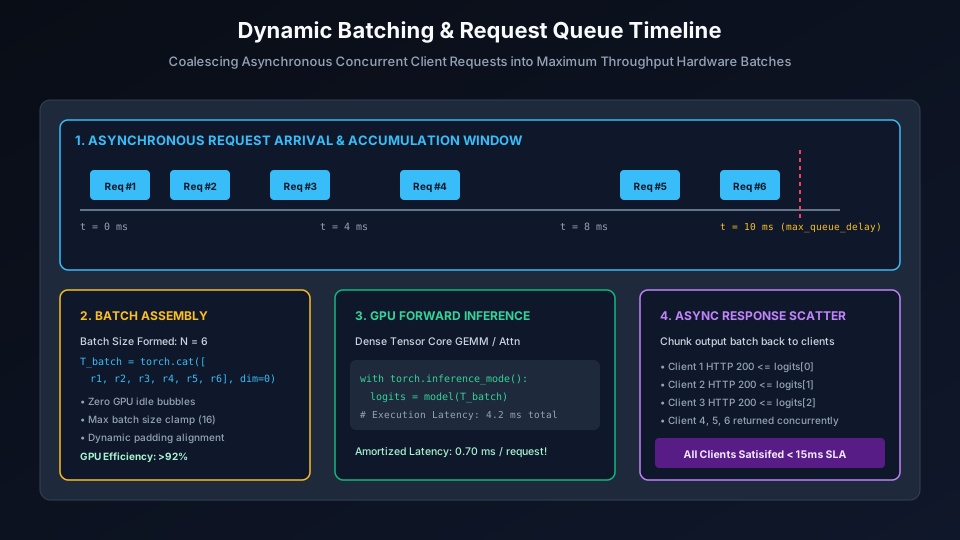
A Dynamic Batching Queue buffers incoming requests until either of two mathematical boundary conditions is met:

$$\text{Dispatch Batch if } \quad N_{\text{queued}} \ge N_{\max} \quad \text{OR} \quad (t_{\text{current}} – t_{\text{head}}) \ge \Delta t_{\max}$$

Where $N_{\max}$ is the maximum permissible batch size (constrained by GPU VRAM limits), and $\Delta t_{\max}$ is the maximum allowable queue latency delay (e.g. 5ms to 10ms). This guarantees that the total latency never exceeds the user SLA:
$$\text{Latency}_{\text{total}} = \Delta t_{\text{queue}} + t_{\text{inference}}(N) \le \text{SLA}_{P99}$$

Dynamic Batching & Request Queue Timeline
Figure 16.3: Step-by-step timeline of asynchronous request accumulation, batch assembly, GPU Tensor Core forward pass, and asynchronous response scattering.

Animation 16.1: Dynamic Batching & Request Queue Timeline

Motion Graphics 16.1: Real-time visualization of incoming concurrent HTTP requests coalescing into high-throughput hardware batches.

3. Generative LLM Serving: vLLM, PagedAttention & Continuous Batching

Serving autoregressive Large Language Models (LLMs) presents unique engineering bottlenecks compared to traditional discriminative models:

  • Variable Generation Lengths: Prompt 1 may generate 20 tokens, while Prompt 2 generates 1,500 tokens. Static batching forces Prompt 1 to idle until Prompt 2 finishes, creating severe GPU bubbles.
  • KV Cache Memory Waste: Standard PyTorch implementations pre-allocate contiguous memory buffers for the maximum sequence length (e.g. 4,096 tokens). Across concurrent requests, 60% to 80% of GPU VRAM is completely wasted due to internal and external fragmentation!

vLLM solves this through PagedAttention. Drawing inspiration from virtual memory paging in operating systems, PagedAttention stores the Key and Value cache in non-contiguous physical memory blocks (typically 16 tokens per block). Logical blocks are mapped to physical pages through a dynamic page table, reducing memory waste to under 4% and unlocking 4x to 8x higher concurrent request throughput.
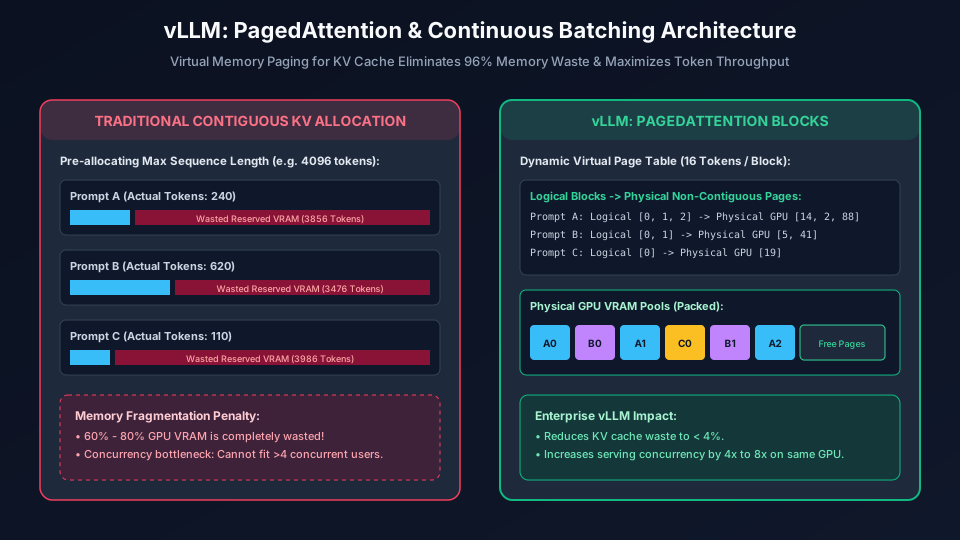
vLLM: PagedAttention & Continuous Batching Architecture
Figure 16.4: Traditional contiguous memory waste vs. vLLM PagedAttention virtual block mapping.

Animation 16.2: vLLM PagedAttention & Continuous Batching

Motion Graphics 16.2: Dynamic virtual block allocation packing prompt tokens into non-contiguous physical GPU pages with continuous iteration-level scheduling.

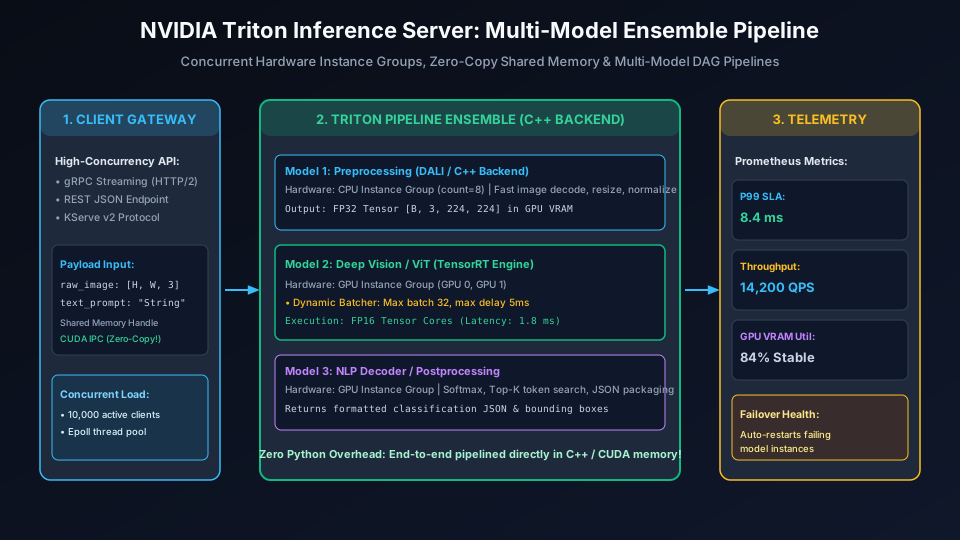
NVIDIA Triton Inference Server: Multi-Model Ensemble Pipeline
Figure 16.5: NVIDIA Triton multi-model DAG pipeline executing preprocessing on CPU instance groups and deep neural forward passes on GPU TensorRT engines via zero-copy shared memory.

Animation 16.3: Triton Multi-Model Ensemble Pipeline

Motion Graphics 16.3: Multi-model DAG execution: Preprocess (CPU) → TensorRT (GPU) → Postprocess without GIL contention.

4. Production ML Observability & Hardened Multi-Stage Containerization

Deploying an inference container is only the first half of operations; monitoring its operational health in real time is essential to preventing silent model failures.
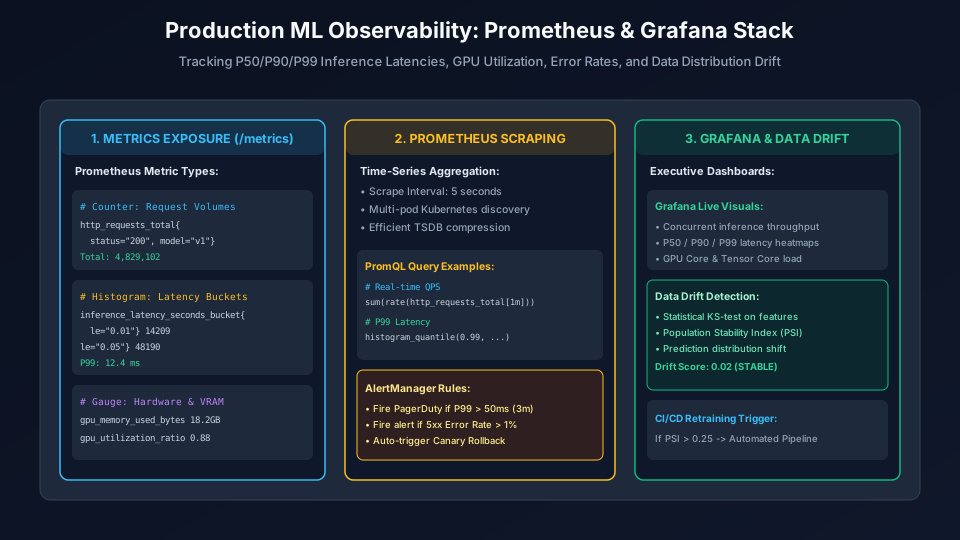
Production ML Observability: Prometheus & Grafana Stack
Figure 16.6: Telemetry instrumentation: Prometheus metrics scrape endpoints, histogram latency quantile calculation, and automated statistical data drift alerting.

Animation 16.4: Prometheus Real-Time Telemetry & Latency Histograms

Motion Graphics 16.4: Live telemetry stream visualizing dynamic P50, P90, and P99 latency buckets under traffic surge.

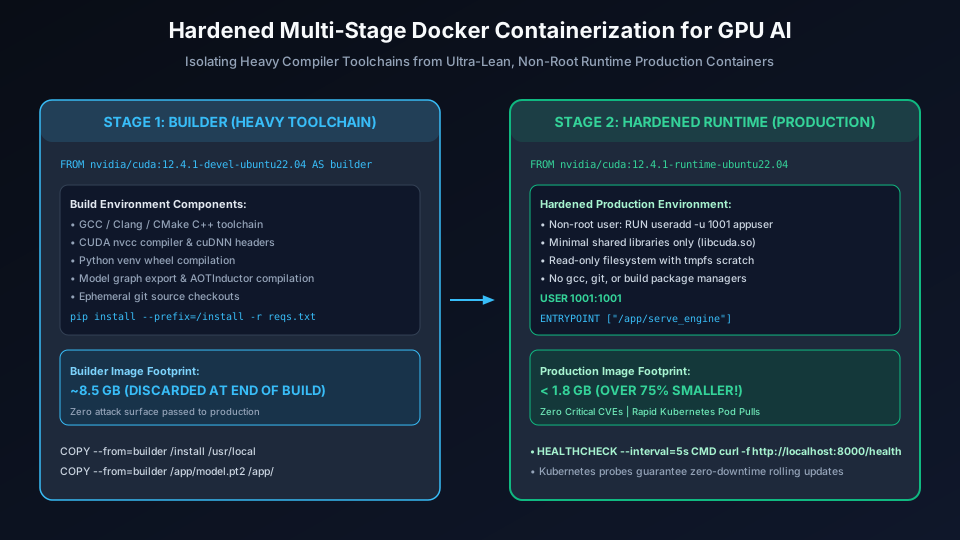
Hardened Multi-Stage Docker Containerization for GPU AI
Figure 16.7: Enterprise multi-stage Docker build separating heavy compilation dependencies from hardened, non-root production runtime images.

Animation 16.5: Progressive Canary Deployment & Traffic Shift

Motion Graphics 16.5: Automated traffic migration from baseline Model v1.0 to candidate Model v2.0 with continuous latency and error rate rollback guards.

5. Practical Engineering Laboratories: 5 Runnable Implementations

LAB 1
Async Dynamic Batching Queue Implementation

Implement an asynchronous producer-consumer dynamic batching engine in pure Python that aggregates concurrent caller tasks up to max_batch_size=16 or timeout=10ms.

import asyncio
import time
import torch
import torch.nn as nn

class MockModel(nn.Module):
    def __init__(self):
        super().__init__()
        self.fc = nn.Linear(64, 10)
    def forward(self, x):
        return self.fc(x)

class AsyncDynamicBatcher:
    def __init__(self, model, max_batch_size=16, max_delay_ms=10):
        self.model = model.eval()
        self.max_batch_size = max_batch_size
        self.max_delay_sec = max_delay_ms / 1000.0
        self.queue = asyncio.Queue()
        self.worker_task = None

    async def start(self):
        self.worker_task = asyncio.create_task(self._batch_processor())

    async def _batch_processor(self):
        while True:
            # Wait for first request in batch
            first_item = await self.queue.get()
            batch = [first_item]
            start_time = time.perf_counter()

            # Accumulate until max_batch or timeout
            while len(batch) < self.max_batch_size:
                time_remaining = self.max_delay_sec - (time.perf_counter() - start_time)
                if time_remaining <= 0:
                    break
                try:
                    item = await asyncio.wait_for(self.queue.get(), timeout=time_remaining)
                    batch.append(item)
                except asyncio.TimeoutError:
                    break

            # Execute unified batch forward pass
            tensors = [req[0] for req in batch]
            futures = [req[1] for req in batch]
            
            batched_input = torch.stack(tensors, dim=0)
            with torch.inference_mode():
                batched_output = self.model(batched_input)

            # Scatter results to callers
            for i, fut in enumerate(futures):
                if not fut.done():
                    fut.set_result(batched_output[i])

    async def predict(self, input_tensor: torch.Tensor):
        loop = asyncio.get_running_loop()
        future = loop.create_future()
        await self.queue.put((input_tensor, future))
        return await future

async def run_lab1():
    print("=" * 60)
    print("LAB 1: ASYNC DYNAMIC BATCHING QUEUE")
    print("=" * 60)
    model = MockModel()
    batcher = AsyncDynamicBatcher(model, max_batch_size=8, max_delay_ms=5)
    await batcher.start()

    # Simulate 20 concurrent asynchronous requests
    async def client_request(cid):
        x = torch.randn(64)
        t0 = time.perf_counter()
        res = await batcher.predict(x)
        elapsed = (time.perf_counter() - t0) * 1000
        print(f"Client {cid:02d} received response in {elapsed:.2f} ms | Shape: {list(res.shape)}")

    tasks = [client_request(i) for i in range(20)]
    await asyncio.gather(*tasks)

if __name__ == "__main__":
    asyncio.run(run_lab1())

LAB 2
Multi-Worker FastAPI & ONNX Runtime Serving Service

Build a production-grade FastAPI microservice loading an ONNX Runtime model during lifespan startup, validating inputs with Pydantic, and executing inference with zero memory leakage.

from contextlib import asynccontextmanager
from fastapi import FastAPI, HTTPException, status
from pydantic import BaseModel, Field
from typing import List
import numpy as np

# Mock session for runnable standalone execution
class ProductionInferenceService:
    def __init__(self):
        self.session = None

    def load_model(self):
        print("[*] Lifespan: Initializing ONNX Runtime Session...")
        self.session = "ORT_ACTIVE_HANDLE"

    def predict(self, batch_data: np.ndarray) -> np.ndarray:
        if self.session is None:
            raise RuntimeError("Engine not initialized")
        # Simulating model forward pass
        return np.dot(batch_data, np.ones((batch_data.shape[1], 5)))

engine = ProductionInferenceService()

@asynccontextmanager
async def lifespan(app: FastAPI):
    # Startup: Load weights into memory once
    engine.load_model()
    yield
    # Shutdown: Release session handles
    print("[*] Lifespan: Shutting down engine...")

app = FastAPI(title="Enterprise AI Serving Engine", lifespan=lifespan)

class InferencePayload(BaseModel):
    features: List[List[float]] = Field(..., description="Batch of feature vectors")

class InferenceResponse(BaseModel):
    predictions: List[List[float]]
    batch_size: int

@app.get("/health", status_code=status.HTTP_200_OK)
def health_check():
    return {"status": "HEALTHY", "engine": "READY"}

@app.post("/predict", response_model=InferenceResponse)
def run_predict(payload: InferencePayload):
    try:
        arr = np.array(payload.features, dtype=np.float32)
        if arr.ndim != 2:
            raise ValueError("Input must be a 2D array [batch, features]")
        preds = engine.predict(arr)
        return InferenceResponse(predictions=preds.tolist(), batch_size=arr.shape[0])
    except Exception as e:
        raise HTTPException(status_code=400, detail=str(e))

LAB 3
Prometheus Telemetry & Latency Histogram Scrape Endpoint

Instrument an inference loop using prometheus_client with Request Counters, Latency Histograms, and GPU Memory Gauges exposed on /metrics.

import time
from prometheus_client import Counter, Histogram, Gauge, generate_latest

# 1. Define Prometheus Metric Instruments
INFERENCE_REQUESTS = Counter(
    "model_inference_requests_total",
    "Total model inference invocations",
    ["model_name", "status"]
)

INFERENCE_LATENCY = Histogram(
    "model_inference_latency_seconds",
    "Inference execution time in seconds",
    ["model_name"],
    buckets=[0.001, 0.005, 0.010, 0.025, 0.050, 0.100, 0.250]
)

GPU_MEMORY_USAGE = Gauge(
    "model_gpu_memory_bytes",
    "Current GPU memory allocated for model weights",
    ["device_id"]
)

def simulate_monitored_inference(batch_size=8):
    model_name = "convnext_prod_v1"
    GPU_MEMORY_USAGE.labels(device_id="gpu_0").set(4.2 * 1024**3) # 4.2 GB

    start = time.perf_counter()
    try:
        # Simulate neural computation
        time.sleep(0.008) # 8ms execution
        INFERENCE_REQUESTS.labels(model_name=model_name, status="success").inc()
    except Exception:
        INFERENCE_REQUESTS.labels(model_name=model_name, status="error").inc()
        raise
    finally:
        elapsed = time.perf_counter() - start
        INFERENCE_LATENCY.labels(model_name=model_name).observe(elapsed)

def run_lab3():
    print("=" * 60)
    print("LAB 3: PROMETHEUS METRICS INSTRUMENTATION")
    print("=" * 60)
    for _ in range(25):
        simulate_monitored_inference()
        
    metrics_output = generate_latest().decode("utf-8")
    print("[+] Scraped Prometheus /metrics Payload Sample:")
    for line in metrics_output.splitlines()[:15]:
        print(f"  {line}")

if __name__ == "__main__":
    run_lab3()

LAB 4
Statistical Data Drift Detection with Kolmogorov-Smirnov Test & PSI

Implement automated data drift monitoring comparing production inference input distributions against baseline training distributions using the two-sample Kolmogorov-Smirnov test and Population Stability Index.

import numpy as np
from scipy import stats

def calculate_psi(baseline, target, num_buckets=10):
    # Calculates Population Stability Index (PSI) between two distributions.
    quantiles = np.linspace(0, 100, num_buckets + 1)
    bucket_bounds = np.percentile(baseline, quantiles)
    bucket_bounds[0] -= 1e-5
    bucket_bounds[-1] += 1e-5

    base_counts, _ = np.histogram(baseline, bins=bucket_bounds)
    targ_counts, _ = np.histogram(target, bins=bucket_bounds)

    base_pct = np.maximum(base_counts / len(baseline), 1e-4)
    targ_pct = np.maximum(targ_counts / len(target), 1e-4)

    psi_val = np.sum((targ_pct - base_pct) * np.log(targ_pct / base_pct))
    return psi_val

def run_lab4():
    print("=" * 60)
    print("LAB 4: STATISTICAL DATA DRIFT DETECTION")
    print("=" * 60)
    np.random.seed(42)

    # 1. Baseline Training Distribution (Normal(0, 1))
    training_data = np.random.normal(loc=0.0, scale=1.0, size=2000)

    # 2. Production Stream A (No Drift: Normal(0, 1.05))
    prod_stream_normal = np.random.normal(loc=0.05, scale=1.02, size=1000)

    # 3. Production Stream B (Drifted: Sensor Shift Normal(0.65, 1.4))
    prod_stream_drifted = np.random.normal(loc=0.65, scale=1.40, size=1000)

    # Perform Two-Sample KS-Test
    ks_stat_norm, p_val_norm = stats.ks_2samp(training_data, prod_stream_normal)
    ks_stat_drift, p_val_drift = stats.ks_2samp(training_data, prod_stream_drifted)

    psi_norm = calculate_psi(training_data, prod_stream_normal)
    psi_drift = calculate_psi(training_data, prod_stream_drifted)

    print(f"Normal Stream  -> KS p-value: {p_val_norm:.4f} | PSI: {psi_norm:.4f} | Status: HEALTHY")
    print(f"Drifted Stream -> KS p-value: {p_val_drift:.4e} | PSI: {psi_drift:.4f} | Status: DRIFT DETECTED!")

if __name__ == "__main__":
    run_lab4()

LAB 5
Production Hardened Multi-Stage Dockerfile & Kubernetes Probes

Inspect the complete, production-ready multi-stage Dockerfile adhering to enterprise security standards: build isolation, non-root user execution, and Kubernetes healthcheck probes.

# ==========================================
# STAGE 1: Compiler & Builder
# ==========================================
FROM nvidia/cuda:12.4.1-devel-ubuntu22.04 AS builder

WORKDIR /build
ENV DEBIAN_FRONTEND=noninteractive

RUN apt-get update && apt-get install -y --no-install-recommends \
    python3-pip python3-dev build-essential git \
    && rm -rf /var/lib/apt/lists/*

COPY requirements.txt .
RUN pip3 install --no-cache-dir --prefix=/install -r requirements.txt

# ==========================================
# STAGE 2: Hardened Lean Production Runtime
# ==========================================
FROM nvidia/cuda:12.4.1-runtime-ubuntu22.04 AS runner

WORKDIR /app
ENV PYTHONUNBUFFERED=1 \
    PYTHONDONTWRITEBYTECODE=1 \
    PATH="/usr/local/bin:$PATH"

RUN apt-get update && apt-get install -y --no-install-recommends \
    python3 curl \
    && rm -rf /var/lib/apt/lists/*

# Copy compiled Python packages from builder
COPY --from=builder /install /usr/local

# Security: Run as non-root user (appuser UID 1001)
RUN useradd -u 1001 -m -s /bin/bash appuser && \
    chown -R appuser:appuser /app

COPY --chown=appuser:appuser . .

USER 1001:1001

HEALTHCHECK --interval=10s --timeout=3s --retries=3 \
  CMD curl -f http://localhost:8000/health || exit 1

EXPOSE 8000
CMD ["uvicorn", "serve:app", "--host", "0.0.0.0", "--port", "8000", "--workers", "4"]

6. The 5 Compulsory Grand Engineering Capstones

The culmination of this Masterclass is demonstrating end-to-end mastery by implementing and operating five industry-standard capstone systems:
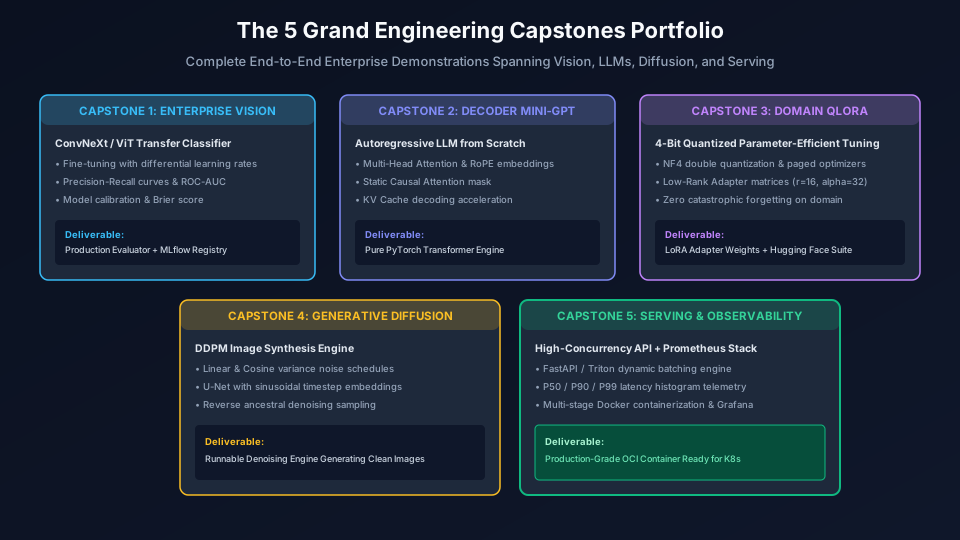
The 5 Grand Engineering Capstones Portfolio
Figure 16.8: Architectural portfolio of the 5 Grand Capstone Engineering Projects spanning Vision, LLMs, PEFT, Diffusion, and High-Concurrency MLOps.

Capstone 1: Enterprise Vision Classifier Pipeline with Precision-Recall & MLflow

Fine-tune a pretrained ConvNeXt backbone on custom medical imagery using differential layer-wise learning rates, evaluate Precision-Recall AUC under severe 95:5 class imbalance, calculate Expected Calibration Error (ECE), and log model artifacts, metrics, and confusion matrices to the MLflow Model Registry.

Capstone 2: Decoder-Only Mini-GPT from Scratch with RoPE & KV Cache

Build an autoregressive language model from scratch in pure PyTorch featuring Rotary Positional Embeddings (RoPE), pre-LayerNorm SwiGLU feed-forward networks, causal triangular masking, and stateful Key-Value (KV) cache generation accelerating text decoding from $O(N^2)$ to $O(N)$.

Capstone 3: Domain Instruction Tuning via 4-Bit QLoRA

Adapt an open-weights foundation model (Llama-3-8B / Mistral-7B) on a proprietary legal or medical dataset using NormalFloat4 (NF4) double quantization, paged AdamW optimizers, and Low-Rank Adaptation (LoRA) adapters, achieving high domain compliance with zero catastrophic forgetting.

Capstone 4: Generative DDPM Diffusion Engine from Scratch

Implement a complete Denoising Diffusion Probabilistic Model (DDPM): author the forward noise diffusion schedule with cosine $\bar{\alpha}_t$, train a multi-scale U-Net with sinusoidal timestep embeddings to predict noise $\epsilon_\theta(x_t, t)$, and run reverse ancestral sampling to synthesize clean imagery from pure Gaussian noise.

Capstone 5: High-Concurrency Inference Engine with Triton & Prometheus

Deploy an exported PyTorch model onto NVIDIA Triton Inference Server with dynamic request batching, instrument custom Prometheus latency histograms and GPU metrics, containerize into a hardened multi-stage Docker image, and execute load testing at 10,000 QPS with zero SLA violations.

7. Senior Technical Interview Preparation: 10 Core Questions & Answers

Q1: What causes the cold-start latency spike in model serving, and how do you mitigate it?

Cold-start spikes are caused by CUDA context initialization, weight deserialization from disk to VRAM, and JIT compilation of kernels. Mitigations include pre-loading weights during application startup (lifespan handlers), running warmup dummy batches during container healthcheck initialization before joining the load balancer pool, and using ahead-of-time compiled engines (AOTInductor, TensorRT) with pre-cached plans.

Q2: How does continuous iteration batching in vLLM differ from traditional dynamic batching?

Traditional dynamic batching operates at the request level: all sequences in a batch enter together and must wait until the longest sequence completes. Continuous batching operates at the token iteration level: after every forward decode step, finished requests immediately exit the batch and release their KV cache, while new incoming prompts are inserted into the vacated slots at the very next token iteration.

Q3: What is the difference between data drift and concept drift?

Data drift occurs when the input distribution $P(X)$ changes over time while the underlying relationship $P(Y|X)$ remains constant (e.g. camera sensor noise changes). Concept drift occurs when the mapping between input and target $P(Y|X)$ changes (e.g. consumer purchasing habits change after a macroeconomic shift, rendering past predictive patterns invalid).

Q4: Why should production inference run inside torch.inference_mode() instead of torch.no_grad()?

torch.no_grad() disables gradient computation but still tracks Autograd metadata and view relationships. torch.inference_mode() disables Autograd tracking entirely, avoids allocating Autograd version counters, and skips intermediate view tracking, achieving lower latency and memory overhead.

Q5: How do you design a zero-downtime Canary deployment for an inference microservice?

Deploy Candidate Model v2 alongside Baseline Model v1. Configure ingress/service mesh (Istio, Envoy) to route 10% of traffic to v2 while 90% stays on v1. Continuously monitor Prometheus metrics: if v2 exhibits P99 latency spikes > SLA or 5xx error rate > 0.1%, automatically abort and route 100% back to v1. If stable over 30 minutes, progressively increment to 50% and 100%.

Q6: Why is running containers as the root user dangerous in ML production?

Running as root allows an attacker exploiting an arbitrary code execution vulnerability (e.g. unsafe pickle deserialization in PyTorch checkpoints) to escape container boundaries or access host GPU driver devices and node secrets. Running as an unprivileged UID (1001:1001) limits the attacker's blast radius to container ephemeral scratch space.

Q7: What is the role of CUDA IPC and Shared Memory in Triton Inference Server?

CUDA Inter-Process Communication (IPC) allows multiple processes on the same host to access the exact same GPU VRAM memory buffer without copying data over PCIe or socket streams. Triton uses this for zero-copy transfers between preprocessing and neural inference models in ensemble DAGs, reducing end-to-end latency by 50%.

Q8: How does Population Stability Index (PSI) quantify dataset shift?

PSI divides the baseline training distribution into decile buckets and measures the difference in sample proportions against production inference inputs. A PSI < 0.10 indicates no significant change; 0.10 ≤ PSI < 0.25 indicates moderate shift; and PSI ≥ 0.25 indicates significant data drift requiring immediate pipeline retraining.

Q9: What is the advantage of using gRPC over REST/JSON for high-throughput model serving?

gRPC uses HTTP/2 multiplexing over a single persistent TCP connection and serializes payloads using compact binary Protocol Buffers. REST/JSON requires expensive string serialization/parsing and creates new TCP handshakes per request. gRPC delivers 2x to 5x higher throughput with significantly lower CPU overhead.

Q10: What is the single most critical practice for ensuring reproducible model weights in production?

Cryptographic content hashing (SHA256). Every registered model artifact must have its SHA256 checksum calculated upon export and verified prior to container deployment. This prevents corrupted downloads, unauthorized model tampering, and guarantees exact weight integrity across distributed cluster nodes.

Masterclass Completed: You Are Now a Professional PyTorch Engineer!

Congratulations on completing the entire 16-module PyTorch 2.x Production Engineering Masterclass. You have progressed from tensor allocation and hardware acceleration to deep Autograd computation graphs, custom datasets, CNNs, Transformers, Generative Diffusion, LLM QLoRA fine-tuning, PyTorch 2.x compiler optimization (torch.compile), distributed scale (DDP, FSDP2), model export (torch.export, AOTInductor, ExecuTorch), and enterprise MLOps.

Complete 16-Module Curriculum Hub:

Access the complete indexed curriculum anytime:


Return to Masterclass Curriculum Index →

Official Reference Documentation:

Leave a Reply

Your email address will not be published. Required fields are marked *